What's going on in Mr. Solarz' Class?
  • Parent (Current Newsletter)
    • Additional Parent Resources >
      • Homework Guidance for Parents
      • WEX - Writer's Express
      • Our Classroom YouTube Page
      • Should I grade homework?
      • Articles that Explain my Philosophy of Teaching
      • Parents Supporting 21st Century Learning
    • Daily Photo Journal >
      • 2014-2015 DaIly Photo Journal
      • 2013-2014 Daily Photo Journal
      • 2012-2013 Daily Photo Journal
    • Tentative Schedule this Week
    • Parent-Teacher Conference Schedule
    • Monitoring Your Child's Progress in Spelling
    • Calendar
    • Printables
    • 21st Century Skills
    • Westgate Social Work
    • Bessie's Table Soup Kitchen
  • Students
    • Overflow Roll-Out >
      • Contests You Can Enter!
      • Student Quotes
      • Websites to Visit for Homework!
      • REARJMCL
    • Calendar
    • Mini-Lessons
    • I Never Knew That!
    • History Alive! >
      • Sign-In Page
      • Online Tutorial
      • History Alive 10 Quiz
    • Spelling
  • Educators
    • Mr. Solarz' ePortfolio >
      • Teacher Evaluation
      • Domain3
      • Domain4
      • My Digital Scrapbook
      • Finland
    • Workshops I've Led >
      • How to Set Up and Run a Mystery Skype Session
      • Creating Your 21st Century Classroom
      • Twitter for Educators
      • Leading Children to Pursue their Passions
      • Becoming a Global Classroom Through Mystery Skypes
      • Enriched Learning Projects
      • Developing Units with 21st Century Skills in Mind
      • Who Owns the Learning? Examples of 5th Graders Running the Show
      • A Brief Introduction to China (for 2nd Graders)
    • 21st Century Learning >
      • Resources for Teachers >
        • 21st Century Skills
        • The 21st Century Skill Series of Videos
      • Examples of 21st Century Education in Action >
        • Self-Directed Students
      • 21st Century Assessment
      • Web 2.0 Tools Used in Our Classroom
      • Articles for 21st Century Teaching (Updated Daily)
      • Motivational Speakers
    • Curricular Units >
      • Social Studies Units >
        • The 2012 Presidential Election
        • The Revolutionary War
        • U.S. Constitution and Government
        • Westward Movement
      • Science Units >
        • Energy
        • Science Fair
        • Human Body Systems in Motion
        • Human Body Systems in Motion
        • Watery Earth
    • EdChat Archives >
      • #TLAP
      • #5thchat
      • #21stedchat
    • My Philosophy of Education
    • Tips and Tricks for the Elementary Classroom
    • China (Photos)
  • Past
    • 2013-2014 >
      • Year-Long Activities >
        • Passion Time >
          • Passion Projects >
            • 2013-2014 Passion Projects >
              • Passion Projects 10/11/13
              • Passion Projects 11/22/13
              • Passion Projects 12/20/13
              • Passion Projects 2/12/14
              • Passion Projects 3/21/14
              • Passion Projects 5/2/14
              • Passion Projects 6/2/14
            • 2012-2013 Passion Projects >
              • Passion Projects 1
              • Passion Projects 2
          • Guidelines for Creating Your Final Product
        • New Assignments
        • Mystery Skype
        • Literature Circles >
          • Discussions & Signposts
          • Book Talks >
            • Submit Your YouTube URL Here
      • Spring Trimester >
        • Our Learning Experiences
        • Westward Expansion >
          • Oregon Trail Pastimes
          • VoiceThread Blog
          • Pinterest
          • VoiceThread
          • Timeline
          • Diigo
          • Google Presentation
          • Photo Stories
          • Tableaux Vivants
          • Daily Travel Log
          • Fictional Travel Log
          • Video Journal
        • WEX - Fictional Narratives
        • 21st Century Skills
        • Motivational Posters
        • Watery Earth >
          • Bodies of Water
        • Colonize Mars! >
          • Claiming Mars For Ourselves
      • Winter Trimester >
        • 100 Word Challenge
        • Stations
        • Human Body Unit
        • Out Of My Mind
      • Fall Trimester >
        • Historical Reenactment
        • Tessellations
    • 2012-2013 >
      • April/May/June >
        • Mystery Skype
        • Colonize Mars!
        • Science Fair 2013
      • February/March >
        • ThingLink
        • Human Body
        • Revolutionary War Simulation
        • Global Literature Circles
        • ISAT Test Prep
      • January >
        • Field Museum
        • Wonder >
          • Character Analyses
          • Teacher Notes for Wonder - R.J. Palacio
        • Google Groups
      • November/December >
        • 12/12/12
        • Energy Debates >
          • Energy Debates Videos!
          • Energy Debate Blog Template
        • Presidential Elections >
          • The 2012 Presidential Election
          • Presidential Election Glogs
          • Presidential Character Traits
          • Political Parties >
            • Democratic Party
            • Republican Party
            • Green Party
            • Constitution Party
            • Libertarian Party
          • Virtual Debate >
            • Education
            • Health Care
            • Social Security
            • Immigration
          • Infographic Lessons on Prezi
          • Political Polls
          • ELECTION TIME!!!
      • October >
        • Creating Your Class Badges Account
        • Properties of Quadrilaterals
        • WEX Lesson 33 - Human Sculptures
        • Energy
        • 10-11-12 What's Special About It?
        • Mr. Badynee's 50th Birthday!
      • September >
        • Constitution Day - September 17, 2012
        • Character Traits Thesaurus
        • Mad Libs!!!
        • Grammar
    • 2011-2012 >
      • May/June >
        • Science Experiments >
          • Marble Coasters
          • Bubble Busters
          • Geodes
          • Naked Egg Drop
        • Oregon Trail >
          • Reflection Activities >
            • Pinterest
            • Voice Thread/Garage Band
            • Timeline of Events
            • Diigo
            • Google Presentation
            • Photo Album
            • Tableaux Vivants
            • Video Updates
            • Daily Travel Log
            • The "Very Unrealistic Accounts" of our trip west
          • Miscellaneous >
            • Audio ThingLink Map
            • Passtimes/Games/Songs
        • Niche Theory
        • The 5 Love Languages
        • Pool Party
        • History Alive 17
        • Field Day
      • March/April >
        • Phantom Tollbooth >
          • Homework >
            • HW Due 5/3/12 by 4:00 p.m.
            • HW Due 5/14/12 by 4:00 p.m.
            • Character Forum
            • New Characters
            • New Settings
          • Roles >
            • 1 - Detail Tracker
            • 2 - Psychologist
            • 3 - Professor
            • 4 - Philosopher
            • 5 - Cartographer
        • Human Body >
          • Human Body Posters (Pre-Assessment)
          • Human Body Lessons >
            • Heart Rate Graphs
            • Exercise Graph
            • Clothespin Lesson
            • Creating Aliens
            • Hinge Joint Videos
          • How to Write a Reflection
          • Final Assessment & Reflection
        • WEX Fictional Narratives >
          • Sticky Podcasting
          • Podcasts
          • Writing Picture Books
        • Project Citizen: Westgate Database
        • Arbor Day
        • Zero Degree Party!
        • Judge Tristano Visit
      • January/February >
        • Kate Klise Assembly
        • Lara in "Annie"
        • Glogster Project
        • Science Fair
        • Valentine's Day Party
        • Teacher Appreciation Week
      • November/December >
        • Chinese Calligraphy
        • Energy
        • Energy Debates
      • September/October >
        • Rev. War Hero Projects
        • Stations
        • Halloween Party
        • Fall Links
      • Videos
  • Present
    • Passion Time >
      • Passion Time Steps
      • Submit Your Essential Question
      • Essential Questions
      • How to Post Your Passion Project Online
    • 2014-2015 Miscellaneous
    • Energy
    • Wonder
    • Grammar
  • Future
    • Learning About 21st Century Skills
    • Creating Infographics
    • Utilizing the Left and Right Sides of Your Brain
    • Comments 4 Kids
    • Innovation in the Classroom
    • Online Quizzes and Polls
    • Solar Maximum
    • Vocabulary/Parts of Speech
    • The Five Things I've Learned
    • Vialogues (Video Discussions)
    • Creating Online Videos
    • Advanced Storytelling
    • Test Anxiety
    • Responding to Blog Entries
    • Writer's Workshop Blog
    • Recipe Project (Blog)
  • e-Portfolios
    • 2014-2015 Students >
      • Student ePortfolios 0-7 >
        • 1 - Michael
        • 2 - Charlie
        • 3 - Nicole
        • 4 - Stacy
        • 5 - Bela
        • 6 - Kendall
        • 7 - Demetri
      • Student ePortfolios 8-14 >
        • 8 - Emily
        • 9 - Nicky
        • 10 - Hanna
        • 11 - Payton
        • 12 - Hasanain
        • 13 - Tucker
        • 14 - Chris
      • Student ePortfolios 15-21 >
        • 15 - Madi
        • 16 - Aidan
        • 17 - Luke
        • 18 - Kaela
        • 19 - Ryan
        • 20 - Alison
        • 21 - Lucas
    • 2013-2014 Students >
      • Student ePortfolios 0-9 >
        • 0 - Mr. Solarz' Sample Portfolio
        • 1 - Anthony A.
        • 2 - Annie B.
        • 3 - Sadie D.
        • 4 - Ellie D.
        • 5 - Sam D.
        • 6 - Ed D.
        • 7 - Luke D.
        • 8 - Keegan D.
        • 9 - Sean G.
      • Student ePortfolios 10-18 >
        • 10 - David K.
        • 11 - Ethan K.
        • 12 - Sam K.
        • 13 - Abby K.
        • 14 - Justin L.
        • 15 - Jill L.
        • 16 - Giana M.
        • 17 - Charlotte O.
        • 18 - Jack S.
      • Student ePortfolios 19-27 >
        • 19 - Charlie S.
        • 20 - Drew S.
        • 21 - Michael S.
        • 22 - Stefan S.
        • 23 - Charlie S.
        • 24 - Connor W.
        • 25 - Emily W.
        • 26 - Emma W.
        • 27 - Julia Z.
    • 2012-2013 Students >
      • Student Blogs 1-9 >
        • Blog 1
        • Blog 2
        • Blog 3
        • Blog 4
        • Blog 5
        • Blog 6
        • Blog 7
        • Blog 8
        • Blog 9
      • Student Blogs 10-17 >
        • Blog 10
        • Blog 11
        • Blog 12
        • Blog 13
        • Blog 14
        • Blog 15
        • Blog 16
        • Blog 17
      • Student Blogs 18-25 >
        • Blog 18
        • Blog 19
        • Blog 20
        • Blog 21
        • Blog 22
        • Blog 23
        • Blog 24
        • Blog 25
        • Blog 0
    • 2011-2012 Students >
      • Girls from 2011-2012 >
        • Gwendolyn Bennet >
          • Mars Travel Log
        • Dong Ling >
          • Mars Travel Log
        • Sophia Castro >
          • Mars Travel Log
        • Tristan Ely >
          • Mars Travel Log
        • Christine DuPont >
          • Mars Travel Log
        • Ira Matheus >
          • Mars Travel Log
        • Nicoletta Innazzo >
          • Mars Travel Log
        • Kade Bahari >
          • Mars Travel Log
        • Hava Raya >
          • Mars Travel Log
        • Kim Soo >
          • Mars Travel Log
        • Nabili Ngoumba >
          • Mars Travel Log
        • Britta Larson >
          • Mars Travel Log
        • Kristin Gola >
          • Mars Travel Log
      • Boys from 2011-2012 >
        • Dutch Vermont >
          • Mars Travel Log
        • Jose Leonardo >
          • Mars Travel Log
        • Otis Marley >
          • Mars Travel Log
        • Jose Rodriguez >
          • Mars Travel Log
        • Peter Anderson >
          • Mars Travel Log
        • Samir Bakri >
          • Mars Travel Log
        • Sefu Wellingtin >
          • Mars Travel Log
        • Raja Bello >
          • Mars Travel Log
        • Robert Gagne >
          • Mars Travel Log

The Nuts & Bolts of Using Centers in an Intermediate Classroom - What!?

2/1/2014

18 Comments

 
First of all, we call them "Stations" in our classroom. That at least takes some of the "primary" off them!

Stations are an important part of our class for about half the year.  They help me to differentiate instruction for my students, provide enrichment opportunities, allow my students to follow their interests, and most importantly to me: they free up some time to give feedback to my kids on their work!  I often like to schedule as many "pullouts" during this time period as well, since speech, ELL, social work, etc. can all be considered a "station" to a child.  They handle being pulled out so much better when they think of it as a station!

We start "Stations" approximately one third to one half of the way through the school year.  This is when I feel I know my students well enough to create an individualized learning plan for each of my kids without wasting their time.  I have already tried to help them fix certain problems like using periods and capitals, or writing a timed prompt in 15 minutes.  If a student still doesn't show mastery (or close to it) by now, I feel comfortable using some "Stations" time to practice that skill.  It would be silly to do so at the beginning of the year, because so many students improve with just a few reminders or tips.
Picture
Click on any image to enlarge it.


How do I get started with Stations in my Classroom?
Picture
Click on any image to enlarge it.
The rest of this blog post may make more sense after you watch the video at the top of this post.  It shows what the first day of stations looked like in our room.

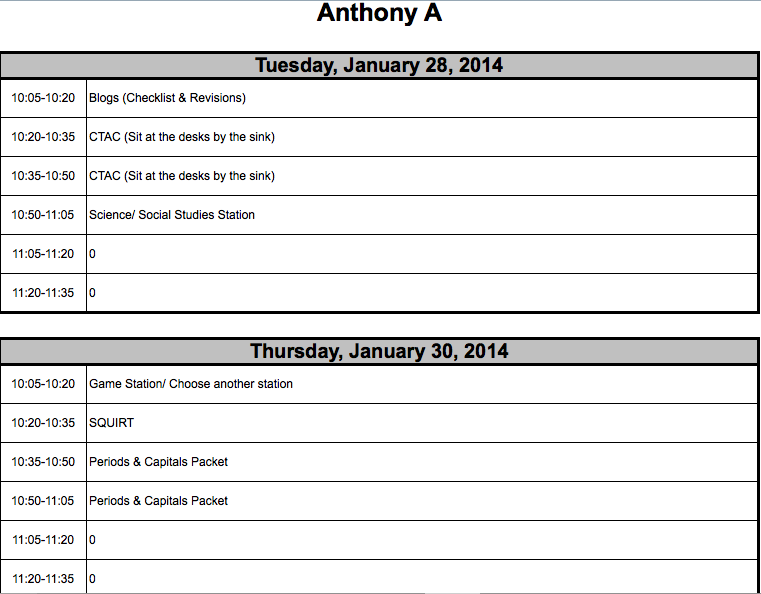
To introduce Stations, I don't spend much time doing so.  I simply tell my students where they can find their schedules for the week (see image at left), show them how to find the directions for each station (seen in the video below), and point to each station in the classroom.  If they need anything from me, it is printed on their schedule to get it from me.  Otherwise, they are not allowed to ask me any questions during a rotation (but they can between rotations).  This is to prevent those constant interruptions while I'm working with a child or a small group.  It also encourages collaboration and problem-solving...


What kinds of stations do I have for my kids? 

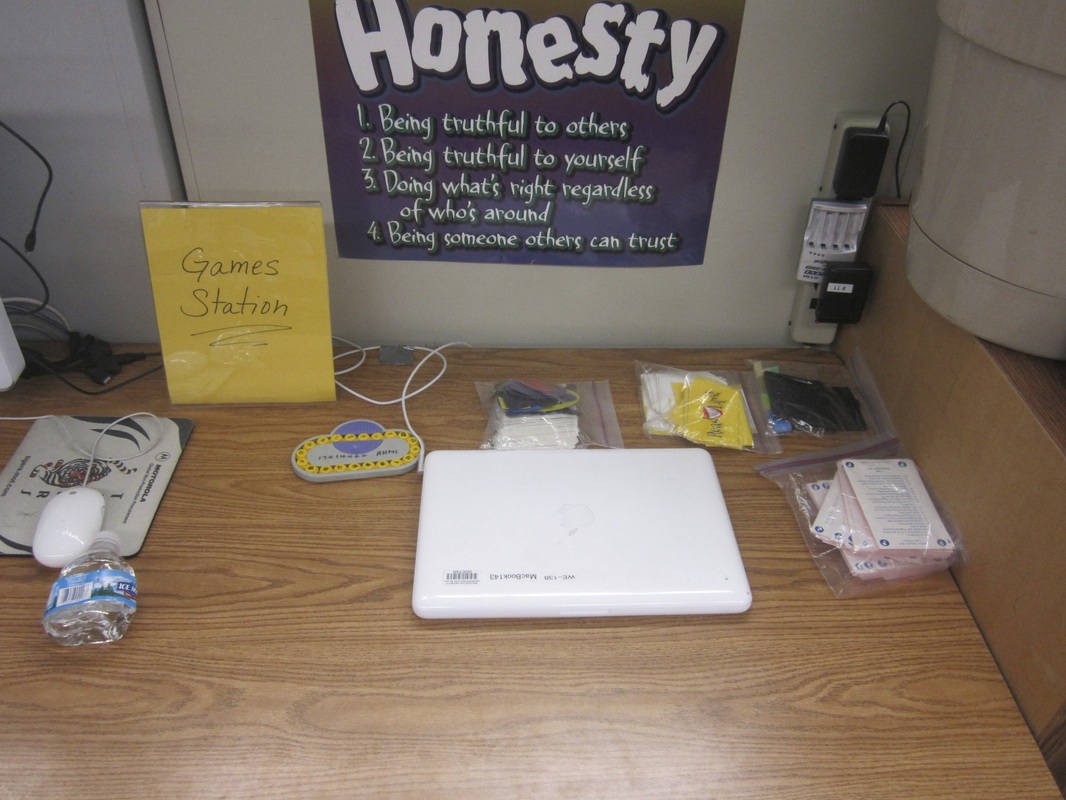
Well, quite a few!  I have the traditional stations based on subjects (e.g. math, science/social studies, writing, etc.), and I have some newer ideas that work best in an intermediate setting.  Those include a Games Station where students have several educational games to choose between.  They have to read the directions themselves (there are always 2-4 students assigned to a station at a time so they can figure it out collaboratively).  You can read about all of my stations in more detail at the end of this post.

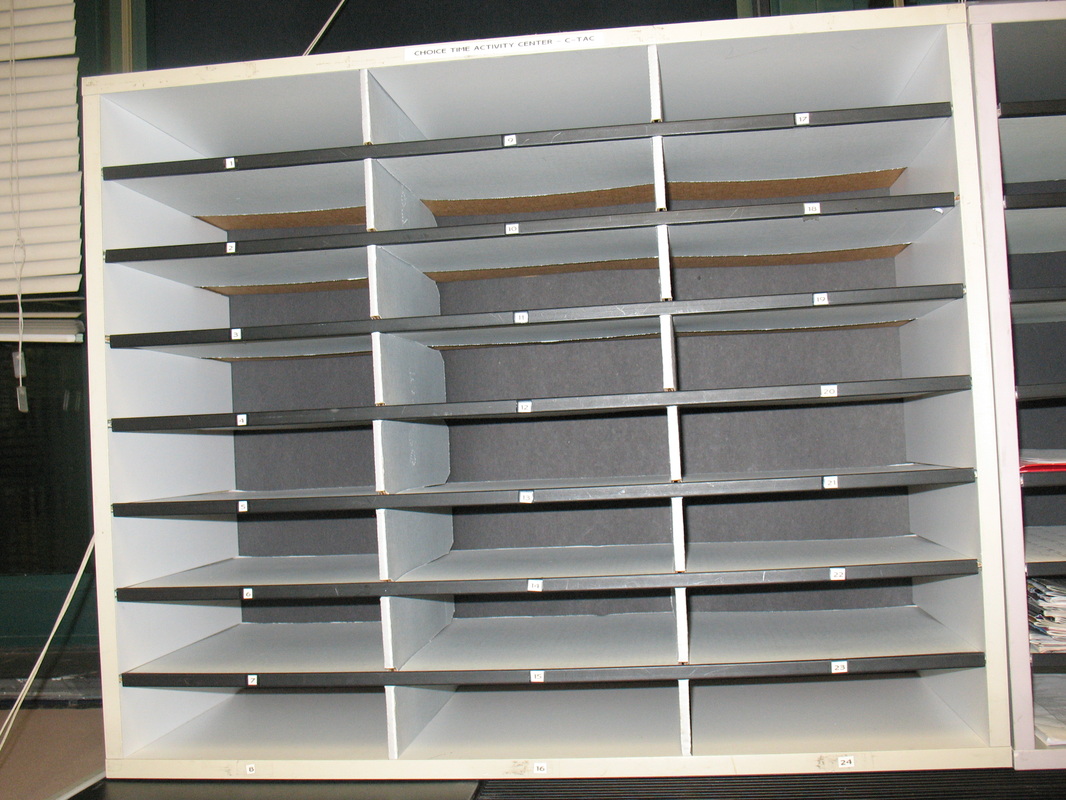
One of my students' favorite stations is actually a packet!  The station is called CTAC, and it stands for Choice Time Activity Center.  This is the name of the place that their CTAC packets are kept.  These packets are often enrichment-based and work directly to increase my students' critical thinking or creative thinking skills.  Some packets are extra practice for skills that a student hasn't mastered yet (they don't really care for those!!!).
Picture
Click on any image to enlarge it.
Picture
Click on any image to enlarge it.
Picture
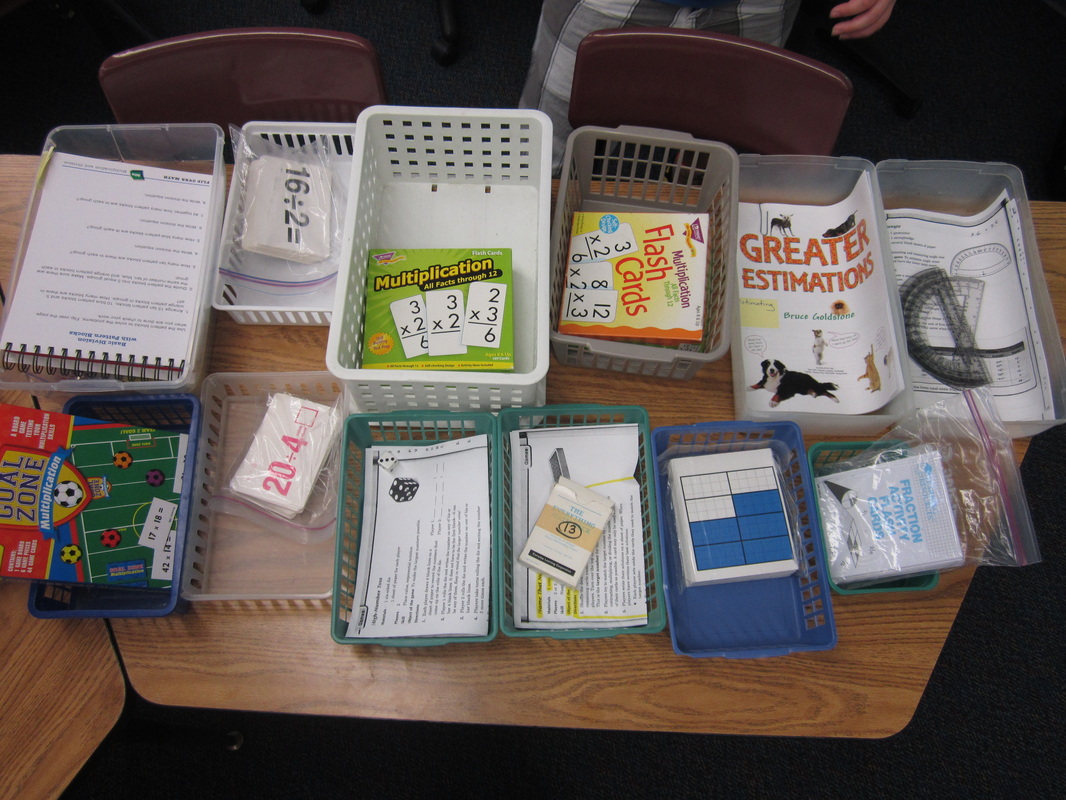
Our Choice Time Activity Center (CTAC).
Picture
My spreadsheet for keeping track of which CTAC packet each child has been assigned.
Where did I get all of my materials from?

I am a crazy good Garage-Saler!  Every Friday morning throughout the summer, I spend about three hours going to local garage sales and picking up items that would work well in my stations!  I also take things people are throwing away if I think they make a good Station item!  I shop at the Dollar Store and love library sales for craft books or old educational board games!  I've written grants.  I've posted requests on DonorsChoose.org.  There are so many ways to accumulate materials for stations, you just have to keep it on your mind so you don't miss any opportunities for a great deal!  :)

Where do I store all this stuff?

When I moved from my classroom of ten years to a new classroom, I took advantage of the opportunity to re-design my classroom space.  So many people these days are swapping out their desks for tables and getting cool rolley-chairs, but I had a zero dollar budget and a bigger need than comfort.  I had to find a way to store all of my books for my students and all of the materials for my stations!!!

One entire wall of my classroom was a blank slate.  It was actually a foldable wall that originally was opened up, but with my loud voice, no one was ever going to want to open that wall up again with me next door!  So I decided to build a massive shelving system along it.  Here is a detailed explanation with photos of how I built it.  I measured everything out, bought the materials from the local hardware store, and had a finished project for about $600.  It took about two days of labor for two people, and has been a God-send for me!  The slide show below shows where I store most of my station materials.  I also have one cabinet and one additional book shelf by the windows dedicated to station supplies!
How do I schedule students for each station?

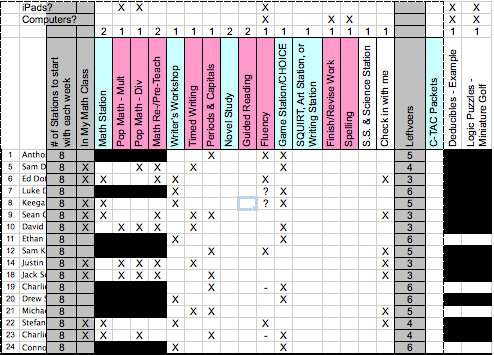
I am a big fan of spreadsheets and have been using Excel since I was a kid!  (I hope I don't lose you as a reader here!)  Although you certainly don't have to take Stations to this level, I love doing so (Sick, huh?)!  Below is a screen shot of my "Planning Worksheet" in my spreadsheet.  It has the students names along the left and the station names at top.  Since many stations are differentiated, I spend time determining which stations each child would benefit from.  Once I have an idea of which stations each child NEEDS, I look at enrichment opportunities and place "X"s in the appropriate cells.
Picture
Click on any image to enlarge it.
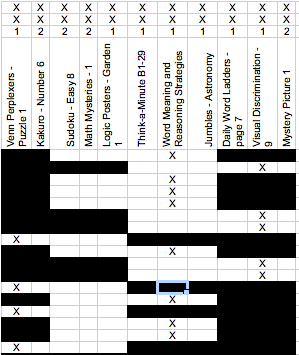
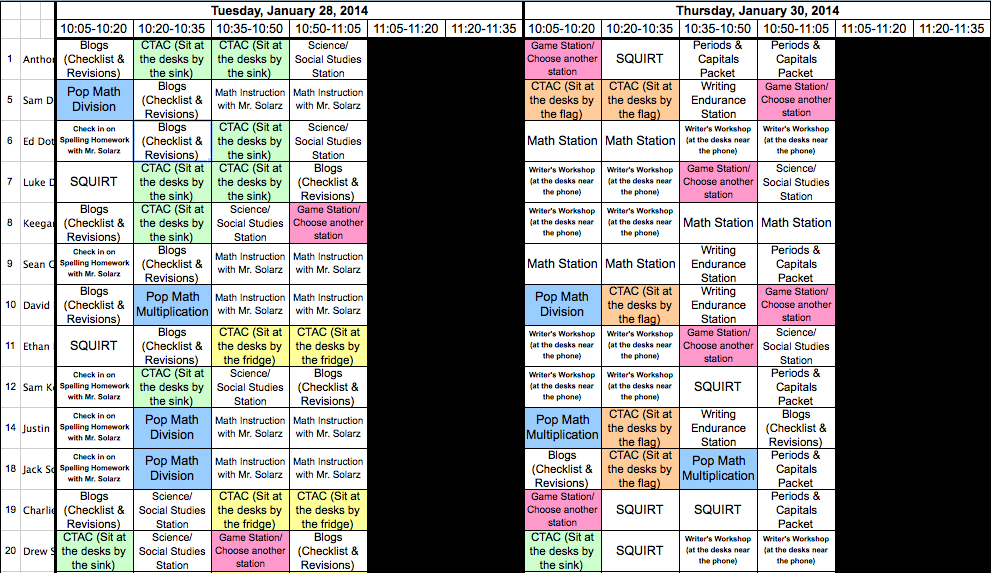
Below is a screen shot of my "Entry Field" worksheet in my spreadsheet.  It has the students names along the left and the times and dates at top.  Black cells indicate that we are not doing Stations at that time (and will produce a "0" on the students' schedule).  The other cells are blank to start.  As I enter the names (and directions) of each station into the cells, the information populates itself on the students' schedules that I will later print out and put in their CTAC bins.  The schedule tells them the date, time, and station for the week.  Excel does this automatically, so I only have to enter the information once onto the "Entry Field" worksheet.  

I use color codes for me, so I can make sure to divide students somewhat evenly when resources are thin, or to ensure that a few people are at a station (and not just one).  I also color code things when trying to make sure I have the right number of kids in my small group when I working with them.  Color codes do not transfer to the students' schedules.
Picture
Click on any image to enlarge it.
Even I get a weekly schedule (and so does my assistant).  That way, we know where we should be at all times.

Stations are an excellent way for me to meet the needs of my students.  It also continues to reinforce the importance of being self-sufficient, problem-solving when stuck, and collaborating with peers rather than relying on teacher direction.  Although my design is quite complex, I encourage you to try Stations with your intermediate students and comment below on your observations!
Picture
Click on any image to enlarge it.
Picture
Click on any image to enlarge it.
More information after the page break below.  Click on "Read More" to read information about each station.

A Brief Explanation of Some of Our Stations:

These were the stations we started this year with.  As the year progresses, more and more stations are added based on needs and interests.

Blogs (Checklists & Revisions)
  • I give my students a list of blogs that are due.  They need to check their blog against my sample blog and its directions.  If they missed any steps or did them without strong effort, they take the time now to revise their posts.  By the end of the year, this will have a self-assessment component.

Pop Math Multiplication/Division
  • Students who are weaker on their math facts use an iPad app called PopMath to practice their facts. I determine if it is multiplication or division.  They determine their level (although I say it must be 5th grade or above).

Check in on Spelling Homework with Mr. Solarz
  • Some of my students have demonstrated a weakness for completing their spelling homework.  (We use spellingcity.com, so students have to play games to practice their words.)  I check in with those students and tell them if they are behind, they need to work during all lunch recesses to catch up.

SQUIRT
  • SQUIRT stands for Sustained Quiet Uninterrupted Reading Time and just means Silent Reading with a self-selected book.  I like the acronym (and so do my students), so we use it!

CTAC
  • CTAC stands for Choice Time Activity Center which is where my students CTAC packets are kept.  These packets are enrichment or reinforcement of skills based on students' needs.

Math Station
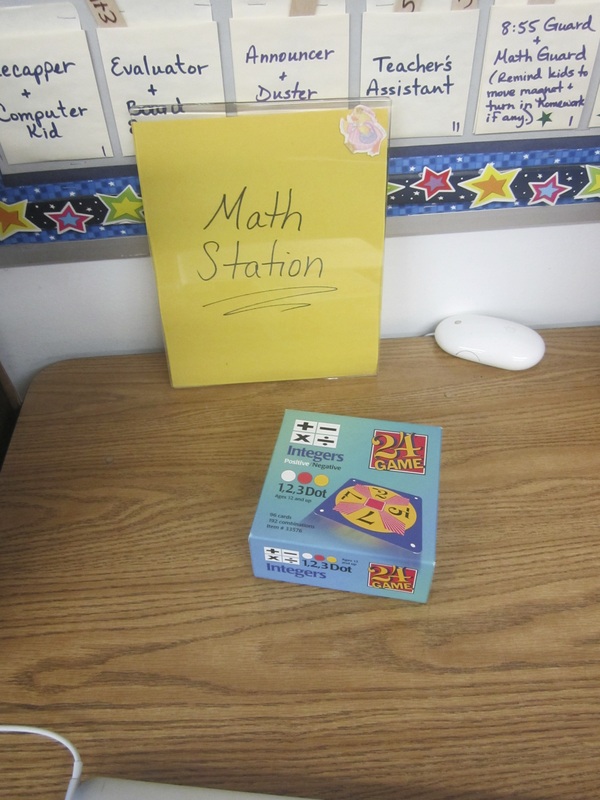
  • I have boxes of math manipulatives, games, and puzzles that relate to each chapter in our math program.  I put out the activities that relate to what we are learning in class and students determine which activities to complete.  Some are hard, some are not as hard, but students have choice here.

Game Station / Choose another station
  • I have a Games Station that contains several fun educational games that students can choose between.  They have to figure out all the games themselves (and can even create a video for others explaining how to play the game once they've mastered it).  If this station is too hard or not fun enough, students can choose any other station to go to.  

Science / Social Studies Station
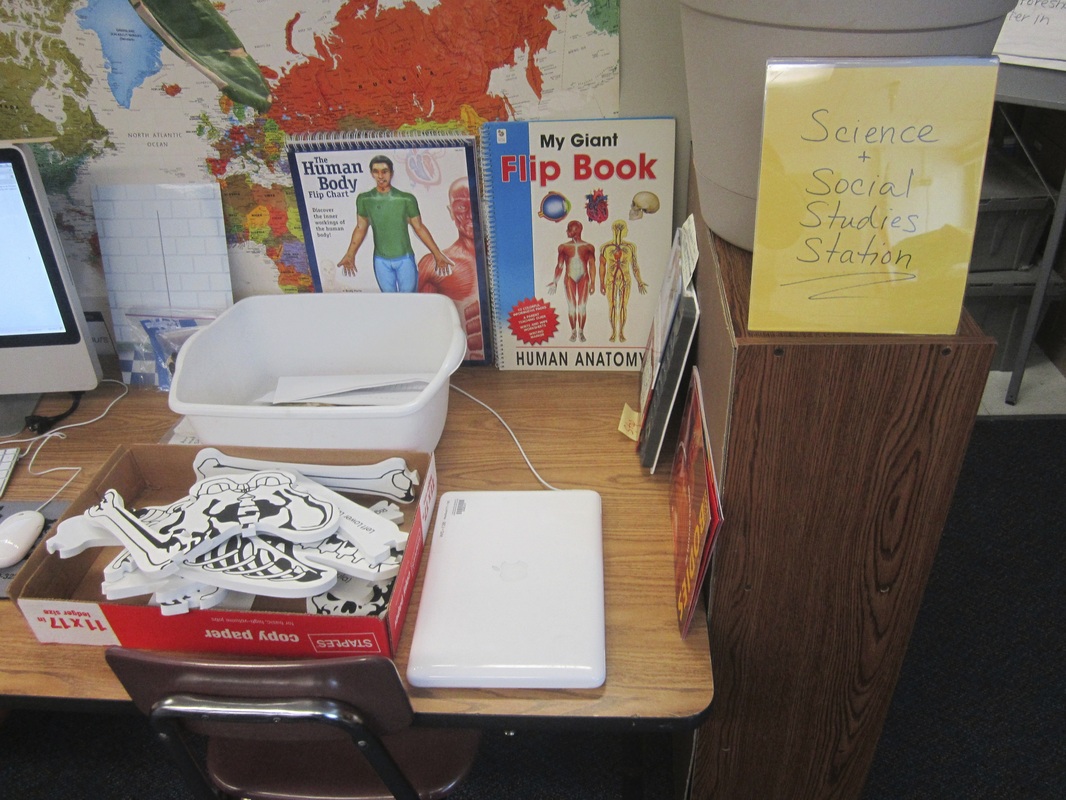
  • This station alternates between Science and Social Studies based on what we're working on (although we do Science and Social Studies concurrently, there is not always a need for both).  It contains things like a turkey skeleton that they need to try to identify each bone, maps & globes, a computer for research, etc. 

Writer's Workshop
  • Since our district has adopted a formal writing program that does not include time for writing workshop, this is my students' opportunity to write about topics that interest them.  I give them a packet that directs their planning, drafting, and revising, so students have some structure, but most of the choice is theirs.

Math Instruction with Mr. Solarz
  • This is my opportunity to Pre-Teach or Re-Teach anything to anyone based on need.  It is great as a review for a test, or to prepare for tricky skills to come.

Periods & Capitals Packet
  • Some of my students still don't use periods and capitals on a regular basis.  This station requires them to complete a packet of worksheets focused on end punctuation and capitalization.  I tell my students they can "graduate" from this station when they correct all of their blog entries correctly on their own time.  If not, they will get more of these packets until the end of the year.  (I know, I'm evil.)  :)  P.S. I have already worked with each child individually to make sure they actually understand these rules and they do - now they just need consistency!

Writing Endurance Station
  • Some of my students can't finish a full-page of writing in 15 minutes (which is a basic requirement of our Writing program).  This station works to increase their writing endurance.  I give them a prompt and they write until they have a full page, even if it cuts into their next station!  I always make sure that their next station is something that will motivate them to work hard!!!

Current Events
  • Some students will watch a CNN Student News episode on an iPad or computer, while others will read an article on Newsela that is at their reading level.  I alternate or focus it based on the needs of each child.  I also have a subscription to Scholastic News and Time for Kids this year, so some small groups will be formed around those issues.

18 Comments
Jessica Marcotte link
2/10/2014 02:45:12 pm

These stations look great. Just wondering what your thoughts on the benefits of centers are. I enjoy letting my students do group work with activities similar to those in the video, but we transition to the same activities as a class. Do you use centers primarily to get use out of a limited number of resources (say you only have 3 ipads in your class). Do you use centers because the students repond better to the presence of a variety of activity in the classroom? I would love to hear your perspective on the benefits of this model.

Reply
Paul Solarz link
2/11/2014 10:21:33 am

Thanks for your comment Jessica -

The main purpose of centers is to differentiate for each student by assigning them stations that meet their needs most effectively. In addition, it allows me the time to meet with students to give them feedback on things they are doing in class. Originally, an additional purpose was to be able to run Guided Reading groups, but that is not how I choose to use my time these days.

I try very hard not to create any stations that would involve each child, as that time would better be spent as an entire class. Although many of these stations would be fine for each child, not everyone gets to do them all - I prioritize which stations each child needs most.

Finally, we do only have 12 iPads in our classroom, so stations do help ensure fair access to those for each of my students.

Thanks again for your comments!

Reply
Julie Lobb
6/28/2015 09:08:47 am

I love this post, great ideas to begin using stations. But I'm wondering if you have the students turn in the work that they complete at the stations? That's the part I seem to get hung up on when thinking about implementing this in my 4th grade classroom.

Reply
Paul Solarz link
7/1/2015 06:10:14 pm

Thank you Julie! It's all based on your beliefs of why students are completing the work. If it is truly practice and you trust your students, then they shouldn't have to turn it in. If you want them to display their work for an authentic audience, then they should post it online somewhere (we use our ePortfolios). If you want to use it as a formative or summative assessment, then have them turn it in, but be sure to give them feedback on it (or a grade if you must). For me, I make sure my students know why they are completing the task and let them decide what to do with it most of the time (it's usually just practice or enrichment for me). Hope that helps!

Reply
Kaitlyn
4/8/2016 10:44:55 am

Hi Paul,

I think what you're doing is great, I love using workstations to differentiate and have been trying to figure out ways to make students more accountable with this independent differentiated work, and also to streamline how they know where to go, transitions, etc. I was wondering what template if any you use on excel to make these schedules. I love that idea of populating one schedule that then populates each students, but am not super excel savvy.

Thank!
Kaitlyn

Reply
Paul Solarz
9/5/2016 08:38:17 am

Sent you an email with a copy of the Excel spreadsheet. Hope that helps! :)

Reply
Julie
8/16/2016 09:23:27 am

Fabulous organization Paul. I have used centers in the past but I really like your individualized schedules, as opposed to travelling in groups. Definitely better for differentiation. I am trying to figure out how you went from your "sheet" input to master schedule, then personal schedule. Any "how-to" tips would be appreciated. Amazing work! Thanks for sharing.

Reply
Paul Solarz
9/5/2016 08:38:46 am

I just sent you an email with a copy of the Excel spreadsheet. Hope that helps! :)

Reply
nuts and bolts Ireland link
6/24/2017 01:49:28 am

I wish more writers of this sort of substance would take the time you did to explore and compose so well. I am exceptionally awed with your vision and knowledge.

Reply
Jen
8/8/2017 08:09:39 am

Hi Paul,

I have been devouring "Learn Like a Pirate" and can't wait for this school year to begin! Like Julie mentioned, my kids have always travelled in groups during rotations. I love your idea of differentiation and individualized student "schedules." Would you mind sharing the spreadsheets with me as well? I'd love to have students take charge of this!

Thanks,
Jen

Reply
Paul Solarz
8/8/2017 10:12:08 am

Hi Jen -

Thanks for the kind words about "Learn Like a PIRATE!" I just sent you the file via email. Hope you find it useful! Have an outstanding school year!!! :)

Paul

Reply
Jennifer
6/7/2021 07:38:13 pm

Hi Paul— absolutely love “Learn like a Pirate!!” I had so many ideas new and old I needed something to put it all into perspective and reality, and your work has done so! May I also have the spreadsheet if still possible?!

Thank you!
Jen

Reply
Paul Solarz link
1/18/2022 06:57:31 pm

Sent!

If anyone else ends up wanting a copy - email me at [email protected] for a quicker reply! :)

Reply
Maureen link
7/13/2021 03:09:55 pm

Hello!
I love the spirit of your book and web info! But, what makes it better are the specific details that you share so freely! Thank You!
Can you send me the stations spreadsheet? It would be a big help. Thanks so much!
Maureen

Reply
Paul Solarz link
1/18/2022 06:58:06 pm

Sent!

If anyone else ends up wanting a copy - email me at [email protected] for a quicker reply! :)

Reply
Rita Brian
4/24/2026 04:36:43 am

HIRE GEO COORDINATES RECOVERY HACKER​ // A CERTIFIED ETHEREUM / USDT & BITCOIN RECOVERY HACKER

I wish to share this information with the public. It’s advisable not to trade with an individual or a bitcoin investment platform if you are not sure about their reputation. Recently, I fell victim to a sophisticated bitcoin scam, resulting in the loss of $930,000. The scammers had cleverly manipulated me into sending the funds to their wallet address, leaving me feeling devastated and hopeless until I met a testimony of Vivian Edwin online talking about GEO COORDINATES RECOVERY HACKER who helped and recovered her funds back. I decided to give it a try and contacted them on

Email: [email protected]

WhatsApp +1 ( 579 ) 397 1584

Website; https://geovcoordinateshac.wixsite.com/geo-coordinates-hack

Through their efforts, I was able to recover my entire loss of $930,000, which was a significant relief and a huge weight off my shoulders. I am extremely grateful and I highly recommend their services to anyone who has fallen prey to similar scams. Their expertise in handling cryptocurrency fraud cases is unmatched, and they can help you track down and recover your lost funds. Don't let scammers take advantage of you. Reach out to a professional recovery service and start the process of getting your money back.

Reply
Bruno James link
6/2/2026 06:41:55 am

I NEED A TRUSTED CRYPTO HACKER THAT CAN RESTORE LOST OR SCAMMED FUNDS.

Are you struggling to get back the money you lost? Every day, countless individuals face the devastating impact of scam operations that drain their hard-earned savings. But there’s good news – GEO COORDINATES RECOVERY HACKER are here to help you recover what’s rightfully yours. I lost my entire savings to a fake crypto investment scam while I was looking for a way to double my savings. After many weeks of trying to find a way to get my money back with no success, I finally came across a crypto recovery company GEO COORDINATES RECOVERY HACKER, a reliable and trustworthy crypto recovery company. I'm immensely grateful for his dedication, professionalism, and unwavering support. You can get in touch with them through below contact details

Email: [email protected]

Telegram @Geocoordinateshacker

WhatsApp ; +1 ( 318 ) 203-3657

Website; https://geovcoordinateshac.wixsite.com/geo-coordinates-hack

I had to send out my review also. They are indeed recommendable.

Reply
Bruno James link
6/2/2026 06:44:21 am

I NEED A TRUSTED CRYPTO HACKER THAT CAN RESTORE LOST OR SCAMMED FUNDS.

Are you struggling to get back the money you lost? Every day, countless individuals face the devastating impact of scam operations that drain their hard-earned savings. But there’s good news – GEO COORDINATES RECOVERY HACKER are here to help you recover what’s rightfully yours. I lost my entire savings to a fake crypto investment scam while I was looking for a way to double my savings. After many weeks of trying to find a way to get my money back with no success, I finally came across a crypto recovery company GEO COORDINATES RECOVERY HACKER, a reliable and trustworthy crypto recovery company. I'm immensely grateful for his dedication, professionalism, and unwavering support. You can get in touch with them through below contact details

Email: [email protected]

Telegram @Geocoordinateshacker

WhatsApp ; +1 ( 318 ) 203-3657

Website; https://geovcoordinateshac.wixsite.com/geo-coordinates-hack

I had to send out my review also. They are indeed recommendable.

Reply


Leave a Reply.

    Picture
    Picture

    My ePortfolio

    I am Paul Solarz, a 5th grade teacher in Arlington Heights, Illinois who is loving 21st Century Education. Please become part of my PLN on Twitter: @PaulSolarz

    Follow @PaulSolarz
    Tweet

    Archives

    April 2014
    February 2014
    January 2014
    December 2013
    November 2013
    October 2013
    September 2013
    August 2013
    May 2013
    April 2013
    February 2013
    January 2013
    December 2012
    October 2012
    September 2012
    August 2012
    May 2012

    Categories

    All

    RSS Feed

    Tweets by @PaulSolarz
Powered by Create your own unique website with customizable templates.