What's going on in Mr. Solarz' Class?
  • Parent (Current Newsletter)
    • Additional Parent Resources >
      • Homework Guidance for Parents
      • WEX - Writer's Express
      • Our Classroom YouTube Page
      • Should I grade homework?
      • Articles that Explain my Philosophy of Teaching
      • Parents Supporting 21st Century Learning
    • Daily Photo Journal >
      • 2014-2015 DaIly Photo Journal
      • 2013-2014 Daily Photo Journal
      • 2012-2013 Daily Photo Journal
    • Tentative Schedule this Week
    • Parent-Teacher Conference Schedule
    • Monitoring Your Child's Progress in Spelling
    • Calendar
    • Printables
    • 21st Century Skills
    • Westgate Social Work
    • Bessie's Table Soup Kitchen
  • Students
    • Overflow Roll-Out >
      • Contests You Can Enter!
      • Student Quotes
      • Websites to Visit for Homework!
      • REARJMCL
    • Calendar
    • Mini-Lessons
    • I Never Knew That!
    • History Alive! >
      • Sign-In Page
      • Online Tutorial
      • History Alive 10 Quiz
    • Spelling
  • Educators
    • Mr. Solarz' ePortfolio >
      • Teacher Evaluation
      • Domain3
      • Domain4
      • My Digital Scrapbook
      • Finland
    • Workshops I've Led >
      • How to Set Up and Run a Mystery Skype Session
      • Creating Your 21st Century Classroom
      • Twitter for Educators
      • Leading Children to Pursue their Passions
      • Becoming a Global Classroom Through Mystery Skypes
      • Enriched Learning Projects
      • Developing Units with 21st Century Skills in Mind
      • Who Owns the Learning? Examples of 5th Graders Running the Show
      • A Brief Introduction to China (for 2nd Graders)
    • 21st Century Learning >
      • Resources for Teachers >
        • 21st Century Skills
        • The 21st Century Skill Series of Videos
      • Examples of 21st Century Education in Action >
        • Self-Directed Students
      • 21st Century Assessment
      • Web 2.0 Tools Used in Our Classroom
      • Articles for 21st Century Teaching (Updated Daily)
      • Motivational Speakers
    • Curricular Units >
      • Social Studies Units >
        • The 2012 Presidential Election
        • The Revolutionary War
        • U.S. Constitution and Government
        • Westward Movement
      • Science Units >
        • Energy
        • Science Fair
        • Human Body Systems in Motion
        • Human Body Systems in Motion
        • Watery Earth
    • EdChat Archives >
      • #TLAP
      • #5thchat
      • #21stedchat
    • My Philosophy of Education
    • Tips and Tricks for the Elementary Classroom
    • China (Photos)
  • Past
    • 2013-2014 >
      • Year-Long Activities >
        • Passion Time >
          • Passion Projects >
            • 2013-2014 Passion Projects >
              • Passion Projects 10/11/13
              • Passion Projects 11/22/13
              • Passion Projects 12/20/13
              • Passion Projects 2/12/14
              • Passion Projects 3/21/14
              • Passion Projects 5/2/14
              • Passion Projects 6/2/14
            • 2012-2013 Passion Projects >
              • Passion Projects 1
              • Passion Projects 2
          • Guidelines for Creating Your Final Product
        • New Assignments
        • Mystery Skype
        • Literature Circles >
          • Discussions & Signposts
          • Book Talks >
            • Submit Your YouTube URL Here
      • Spring Trimester >
        • Our Learning Experiences
        • Westward Expansion >
          • Oregon Trail Pastimes
          • VoiceThread Blog
          • Pinterest
          • VoiceThread
          • Timeline
          • Diigo
          • Google Presentation
          • Photo Stories
          • Tableaux Vivants
          • Daily Travel Log
          • Fictional Travel Log
          • Video Journal
        • WEX - Fictional Narratives
        • 21st Century Skills
        • Motivational Posters
        • Watery Earth >
          • Bodies of Water
        • Colonize Mars! >
          • Claiming Mars For Ourselves
      • Winter Trimester >
        • 100 Word Challenge
        • Stations
        • Human Body Unit
        • Out Of My Mind
      • Fall Trimester >
        • Historical Reenactment
        • Tessellations
    • 2012-2013 >
      • April/May/June >
        • Mystery Skype
        • Colonize Mars!
        • Science Fair 2013
      • February/March >
        • ThingLink
        • Human Body
        • Revolutionary War Simulation
        • Global Literature Circles
        • ISAT Test Prep
      • January >
        • Field Museum
        • Wonder >
          • Character Analyses
          • Teacher Notes for Wonder - R.J. Palacio
        • Google Groups
      • November/December >
        • 12/12/12
        • Energy Debates >
          • Energy Debates Videos!
          • Energy Debate Blog Template
        • Presidential Elections >
          • The 2012 Presidential Election
          • Presidential Election Glogs
          • Presidential Character Traits
          • Political Parties >
            • Democratic Party
            • Republican Party
            • Green Party
            • Constitution Party
            • Libertarian Party
          • Virtual Debate >
            • Education
            • Health Care
            • Social Security
            • Immigration
          • Infographic Lessons on Prezi
          • Political Polls
          • ELECTION TIME!!!
      • October >
        • Creating Your Class Badges Account
        • Properties of Quadrilaterals
        • WEX Lesson 33 - Human Sculptures
        • Energy
        • 10-11-12 What's Special About It?
        • Mr. Badynee's 50th Birthday!
      • September >
        • Constitution Day - September 17, 2012
        • Character Traits Thesaurus
        • Mad Libs!!!
        • Grammar
    • 2011-2012 >
      • May/June >
        • Science Experiments >
          • Marble Coasters
          • Bubble Busters
          • Geodes
          • Naked Egg Drop
        • Oregon Trail >
          • Reflection Activities >
            • Pinterest
            • Voice Thread/Garage Band
            • Timeline of Events
            • Diigo
            • Google Presentation
            • Photo Album
            • Tableaux Vivants
            • Video Updates
            • Daily Travel Log
            • The "Very Unrealistic Accounts" of our trip west
          • Miscellaneous >
            • Audio ThingLink Map
            • Passtimes/Games/Songs
        • Niche Theory
        • The 5 Love Languages
        • Pool Party
        • History Alive 17
        • Field Day
      • March/April >
        • Phantom Tollbooth >
          • Homework >
            • HW Due 5/3/12 by 4:00 p.m.
            • HW Due 5/14/12 by 4:00 p.m.
            • Character Forum
            • New Characters
            • New Settings
          • Roles >
            • 1 - Detail Tracker
            • 2 - Psychologist
            • 3 - Professor
            • 4 - Philosopher
            • 5 - Cartographer
        • Human Body >
          • Human Body Posters (Pre-Assessment)
          • Human Body Lessons >
            • Heart Rate Graphs
            • Exercise Graph
            • Clothespin Lesson
            • Creating Aliens
            • Hinge Joint Videos
          • How to Write a Reflection
          • Final Assessment & Reflection
        • WEX Fictional Narratives >
          • Sticky Podcasting
          • Podcasts
          • Writing Picture Books
        • Project Citizen: Westgate Database
        • Arbor Day
        • Zero Degree Party!
        • Judge Tristano Visit
      • January/February >
        • Kate Klise Assembly
        • Lara in "Annie"
        • Glogster Project
        • Science Fair
        • Valentine's Day Party
        • Teacher Appreciation Week
      • November/December >
        • Chinese Calligraphy
        • Energy
        • Energy Debates
      • September/October >
        • Rev. War Hero Projects
        • Stations
        • Halloween Party
        • Fall Links
      • Videos
  • Present
    • Passion Time >
      • Passion Time Steps
      • Submit Your Essential Question
      • Essential Questions
      • How to Post Your Passion Project Online
    • 2014-2015 Miscellaneous
    • Energy
    • Wonder
    • Grammar
  • Future
    • Learning About 21st Century Skills
    • Creating Infographics
    • Utilizing the Left and Right Sides of Your Brain
    • Comments 4 Kids
    • Innovation in the Classroom
    • Online Quizzes and Polls
    • Solar Maximum
    • Vocabulary/Parts of Speech
    • The Five Things I've Learned
    • Vialogues (Video Discussions)
    • Creating Online Videos
    • Advanced Storytelling
    • Test Anxiety
    • Responding to Blog Entries
    • Writer's Workshop Blog
    • Recipe Project (Blog)
  • e-Portfolios
    • 2014-2015 Students >
      • Student ePortfolios 0-7 >
        • 1 - Michael
        • 2 - Charlie
        • 3 - Nicole
        • 4 - Stacy
        • 5 - Bela
        • 6 - Kendall
        • 7 - Demetri
      • Student ePortfolios 8-14 >
        • 8 - Emily
        • 9 - Nicky
        • 10 - Hanna
        • 11 - Payton
        • 12 - Hasanain
        • 13 - Tucker
        • 14 - Chris
      • Student ePortfolios 15-21 >
        • 15 - Madi
        • 16 - Aidan
        • 17 - Luke
        • 18 - Kaela
        • 19 - Ryan
        • 20 - Alison
        • 21 - Lucas
    • 2013-2014 Students >
      • Student ePortfolios 0-9 >
        • 0 - Mr. Solarz' Sample Portfolio
        • 1 - Anthony A.
        • 2 - Annie B.
        • 3 - Sadie D.
        • 4 - Ellie D.
        • 5 - Sam D.
        • 6 - Ed D.
        • 7 - Luke D.
        • 8 - Keegan D.
        • 9 - Sean G.
      • Student ePortfolios 10-18 >
        • 10 - David K.
        • 11 - Ethan K.
        • 12 - Sam K.
        • 13 - Abby K.
        • 14 - Justin L.
        • 15 - Jill L.
        • 16 - Giana M.
        • 17 - Charlotte O.
        • 18 - Jack S.
      • Student ePortfolios 19-27 >
        • 19 - Charlie S.
        • 20 - Drew S.
        • 21 - Michael S.
        • 22 - Stefan S.
        • 23 - Charlie S.
        • 24 - Connor W.
        • 25 - Emily W.
        • 26 - Emma W.
        • 27 - Julia Z.
    • 2012-2013 Students >
      • Student Blogs 1-9 >
        • Blog 1
        • Blog 2
        • Blog 3
        • Blog 4
        • Blog 5
        • Blog 6
        • Blog 7
        • Blog 8
        • Blog 9
      • Student Blogs 10-17 >
        • Blog 10
        • Blog 11
        • Blog 12
        • Blog 13
        • Blog 14
        • Blog 15
        • Blog 16
        • Blog 17
      • Student Blogs 18-25 >
        • Blog 18
        • Blog 19
        • Blog 20
        • Blog 21
        • Blog 22
        • Blog 23
        • Blog 24
        • Blog 25
        • Blog 0
    • 2011-2012 Students >
      • Girls from 2011-2012 >
        • Gwendolyn Bennet >
          • Mars Travel Log
        • Dong Ling >
          • Mars Travel Log
        • Sophia Castro >
          • Mars Travel Log
        • Tristan Ely >
          • Mars Travel Log
        • Christine DuPont >
          • Mars Travel Log
        • Ira Matheus >
          • Mars Travel Log
        • Nicoletta Innazzo >
          • Mars Travel Log
        • Kade Bahari >
          • Mars Travel Log
        • Hava Raya >
          • Mars Travel Log
        • Kim Soo >
          • Mars Travel Log
        • Nabili Ngoumba >
          • Mars Travel Log
        • Britta Larson >
          • Mars Travel Log
        • Kristin Gola >
          • Mars Travel Log
      • Boys from 2011-2012 >
        • Dutch Vermont >
          • Mars Travel Log
        • Jose Leonardo >
          • Mars Travel Log
        • Otis Marley >
          • Mars Travel Log
        • Jose Rodriguez >
          • Mars Travel Log
        • Peter Anderson >
          • Mars Travel Log
        • Samir Bakri >
          • Mars Travel Log
        • Sefu Wellingtin >
          • Mars Travel Log
        • Raja Bello >
          • Mars Travel Log
        • Robert Gagne >
          • Mars Travel Log

The Role of a Science Fair in the 21st Century Classroom

2/24/2014

8 Comments

 
My class has been hosting a Science Fair every year for the past dozen or so years.  I can't say that I always knew why I continued to make time for it, but it always seemed valuable and worthwhile, so I kept it going.

Today, I see why I continued the tradition.  It wasn't just because I did one as a child and enjoyed it.  It wasn't just because I saw my students explain a scientific discovery in a confident manner.  I continued this tradition because it is inquiry at its finest!  Students wonder about something and explore it!  
Picture
Click on image to see an enlarged version. Credit: http://cultureofyes.files.wordpress.com/2011/07/inquiry.png
So why are Science Fairs becoming so "old-fashioned?"  Why have schools cancelled them in favor of more teacher-directed science lessons?  Shouldn't we be providing more opportunities for students to wonder, explore & experiment, and report out their findings?  I think so!
Picture
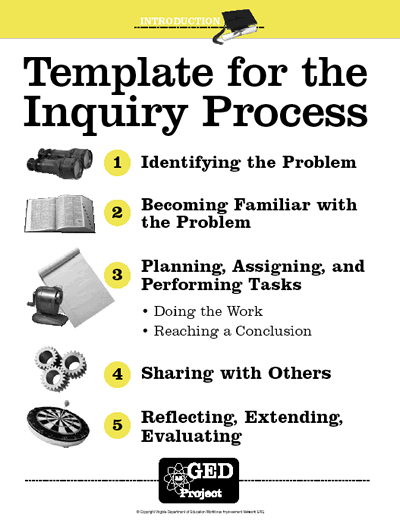
Click on image to see an enlarged version. Credit: http://www.valrc.org/resources/gedasproject /images/inquiry_template_lg.gif
In our class, students are regularly given time to explore interests of their own, not specifically focused on science topics.  We call this: Passion Time.  Passion Time is an opportunity for students to spend a portion of their class time learning about topics of interest to them.  They may research their topic, conduct an experiment, or build something!  They may integrate the arts, video games, or music into their passion projects as well!

When children spend time exploring topics of interest to them during school, they become much more invested in the learning process.  A Science Fair offers students the same benefit, but it focuses their investment on the sciences!

In the image on the left, the Inquiry Process is explained (link).  Our Science Fair follows a similar process.  Students look through Science Fair topic guides looking for something that sparks their interest. When they find something, I work one-on-one with each student to fine-tune their Guiding Question.  Since students are completely in charge of coming up with their area of interest, they are immediately engaged in the process and motivated to learn more!
I take my students through several steps that get each student to learn more about their topic (Review of Literature); predict what they think will happen during their experiment (Hypothesis); identify the components to change, measure, and keep the same (Variables); and plan out how the experiment will happen (Procedure).

After those steps and a few more, we take a couple months to allow the experiments to take place.  Everyone is expected to complete their entire Science Fair project, including the experiment, in class unless they get written permission from a parent requesting that they experiment be conducted at home.  
This allows me to oversee the entire process, provide feedback throughout, and discover what each student is truly capable of doing on his or her own.  Conducting the experiment together can be one of the best ways to bond with your students!  Take a glance at the video to the right showing Keegan, some of his friends, and me breaking four types of wood with a weight being dropped from increasing heights!  What a fun time!
While students conduct their experiments, they collect their data on a self-made Data Table.  These can be done on paper or electronically.  We prefer to use Google Spreadsheets or Excel for ours.  I enjoy helping my students create these tables, because it gets them to see their Dependent and Independent Variables more clearly.  They need to measure how much change is happening (Independent Variable) against what is being changed (Dependent Variable).  
Picture
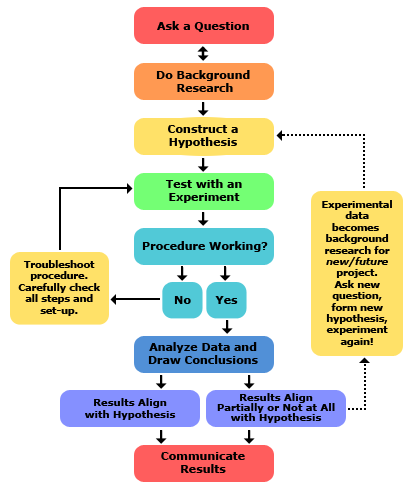
Click on image to see an enlarged version. Credit: http://www.cdn.sciencebuddies.org/Files/5084/7/2013-updated_scientific-method-steps_v6_noheader.png
They truly learn that you can't find out if something is an effective change if you have more than one variable changing at a time!  This is an important concept in the Scientific Method.

In the image on the left, the Scientific Method is described.  I like this image because it includes opportunities to be reflective and adaptable throughout the process.  Although students write a formal procedure prior to experimenting, it's important that they stay flexible and make changes if needed so the experiment works properly.  No one should be forced to keep a procedure that isn't working!

This graphic also encourages students to continue their curiosity after the Science Fair is over by asking a new question, forming a new hypothesis, and trying the experiment again on their own!  This encourages persistence and grit, as students work towards finding the true answers to their questions!
After the experimenting phase, we begin to work together as a class again to complete the rest of the project where we begin to analyze the data and prepare it for others to see.  

We create graphs and our final poster board.  Graphs help other students see the subtle differences in each of the variables.  It quantifies the students data and takes some of the subjectivity out of the data.
Picture
Click on image to see an enlarged version.
Students also work on an oral presentation that draws people in who are walking by during the Science Fair and gets them to want to learn more about their project!  Students are encouraged to have a hook at the beginning that gets people walking by to want to learn more about their project.  Of course, some projects are interesting even without a hook.  Watch a sample video of Brian teaching us about his Science Fair Project.
It is my sincere hope that others will see the value that a Science Fair (especially one conducted fully in school) can have on students' 21st Century skills attainment.  It is my belief that my students have improved their inquiry skills by taking a scientific wonder of theirs and conducting research and an experiment to clarify their understanding.

I believe that my students are improving their executive functioning skills by carefully planning out their steps in their procedure, and following a calendar of mini-deadlines to accomplish a long-term goal.

I believe that my students are also improving some of the following skills during various stages of this process:
  • Think Creatively
  • Think Critically
  • Make Judgments and Decisions
  • Ask Questions
  • Solve Problems
  • Metacognition (Thinking About Our Thinking)
  • Reflect and Synthesize
  • Adapt to Change
  • Think and Learn Flexibly
  • Demonstrate Learning Through All Intelligence Pathways
  • Manage Goals and Time
  • Be a Risk-Taker
  • Be Self-Directed Learners
  • Persist Despite Setbacks
  • Be Curious
  • Manage Projects
  • Produce Results
  • Be Responsible to Yourself and Others
  • Access and Evaluate Information
  • Use and Manage Information
  • Analyze Media
  • Create Media Products
  • Apply Technology Effectively
I hope that you will consider reinstating the Science Fair in your school.  Feel free to dress it up and call it an "Inquiry Fair" or something else that makes it sound more progressive, but you'll know what it really is: a great way for students to learn.

  • Click here to see a slide show of last year's Science Fair Projects!
  • Click here to visit our page from two years ago!
8 Comments

Stepping Back in Time: Teaching Textbook, Study, & Test-Taking Skills Inside a 21st Century Classroom

2/8/2014

13 Comments

 
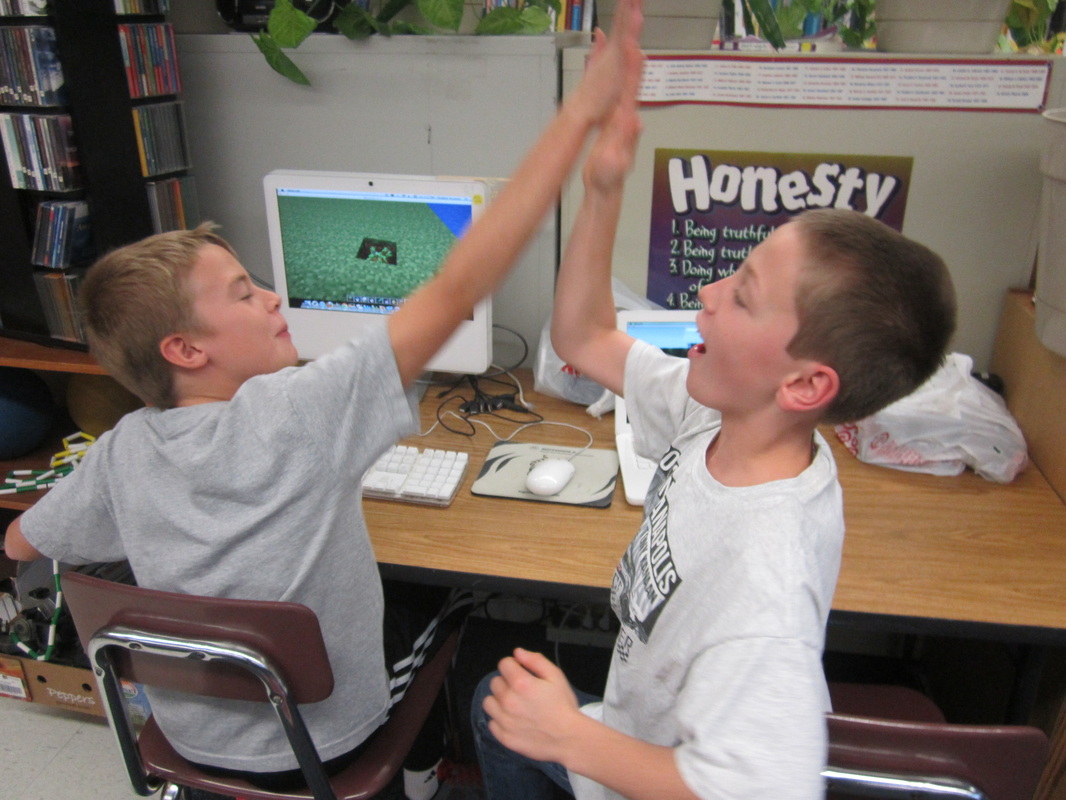
Teaching in a "21st Century Classroom" where everything is collaborative, technology is used for more than half of our day, and there are very few formal assessments can be tough for parents and administrators to completely understand at first.  When their child comes home from school each day and talks about playing Minecraft for an hour and...
Picture
Minecraft success! Anthony and Jack built the Washington Monument.
Picture
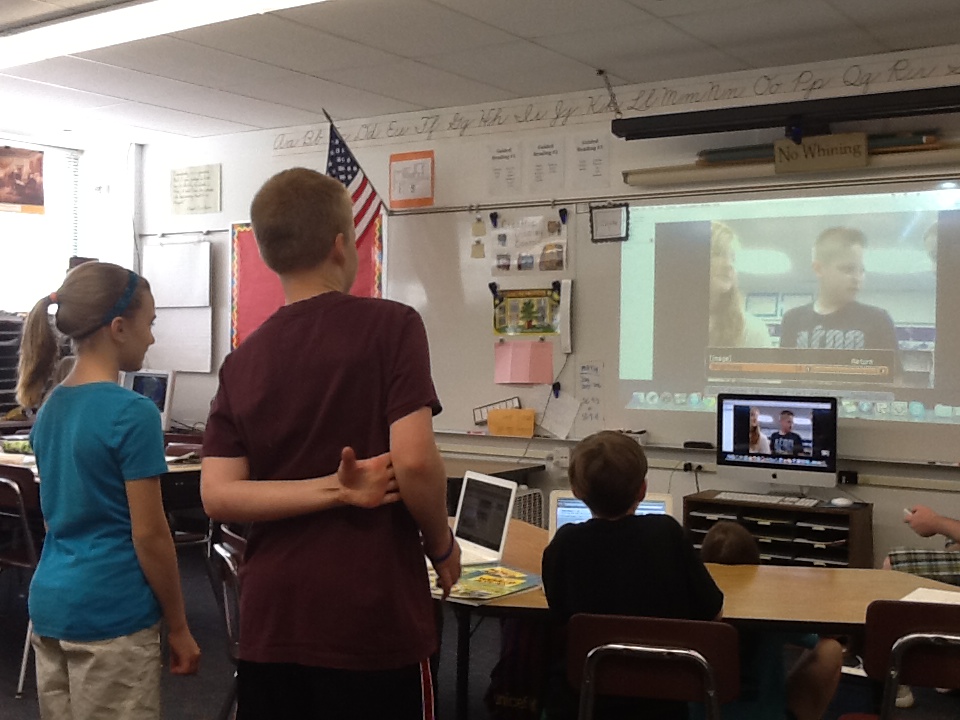
Introducing ourselves during a Mystery Skype.
...Skyping with a class from Sao Paolo, Brazil, some might wonder what it is these kids are being taught these days!  I want my parents and administrators to rest-assured that my students will not only be prepared for a vastly different world than we adults were prepared for, but they'll also be prepared for a typical middle school environment with worksheets, packets, textbooks, and tests.
After all, I want my students to be successful in middle school and beyond and that means learning how to read a textbook, complete worksheets accurately, and prepare for difficult tests!  Just because I don't use those techniques often in my classroom (anymore), doesn't mean that other teachers will do the same.
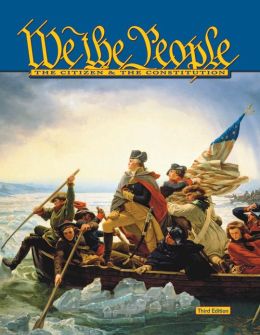
So the way I decided to prepare my students for middle school was by finding a textbook that I actually liked that was written at an appropriate reading level for my students and had rigorous content where students would benefit from teacher-led instruction.

I created worksheet questions that I felt promoted whole class or small group discussions, prompted deep thinking and role-playing, and utilized my students' literal comprehension skills as well as inferential comprehension skills.


Picture
Click on the image above to go to the original source.
I wrote tests that didn't just rely on recall, but on a deep understanding of the important concepts from each chapter.  Although some questions needed to be multiple choice and True/False (to prepare them for these in the future), the best questions I created are short answer and essay (Yes, I teach 5th graders, so I have varied expectations for each student.  An Answer Key alone could not be used to grade these tests!).  

The topic of this curriculum is "U.S. Constitution and Government."  I've selected more rigorous objectives and Big Ideas than our district requires because with increased teacher support should come a higher level of understanding.  You can find our objectives here, along with some of the activities we will be doing in addition to the textbook.
Our culminating activity will take several weeks.  We will participate in a simulation where we colonize Mars!  Wait.  Hopefully, your first reaction is "What does colonizing Mars have to do with our Constitution and government?"  Well, I'm glad you asked!  Students will soon discover once on the red planet that life without rules and laws can be very difficult (thanks to some "events" that happen to make sure they feel that way!).  They will want to create a formal government and might choose to use the U.S. government as a model, or they might not.
Picture
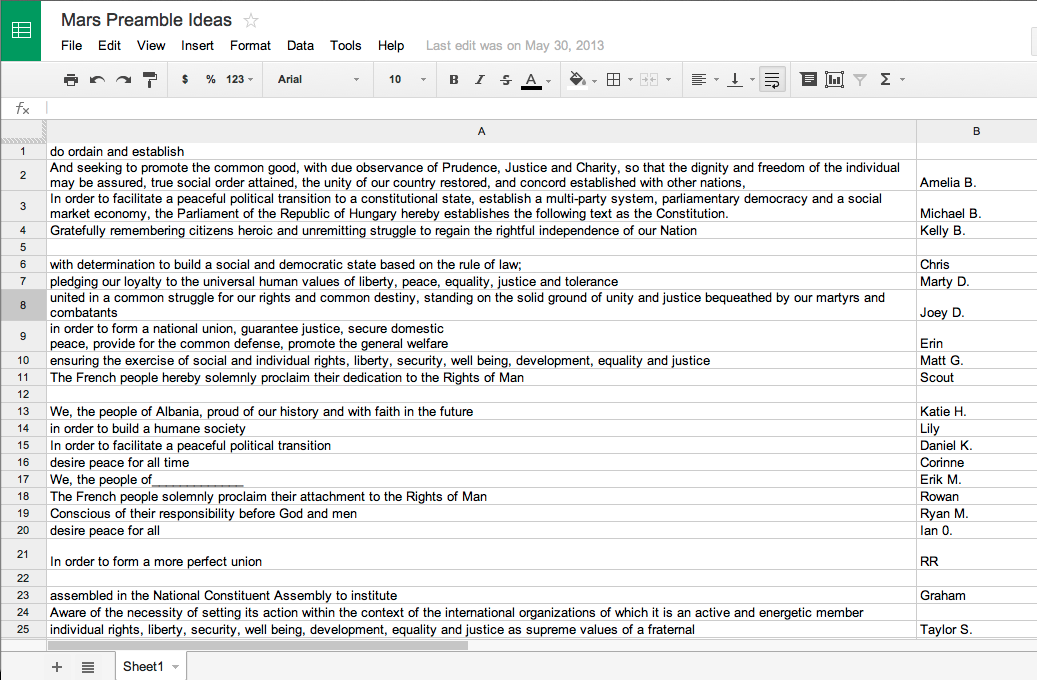
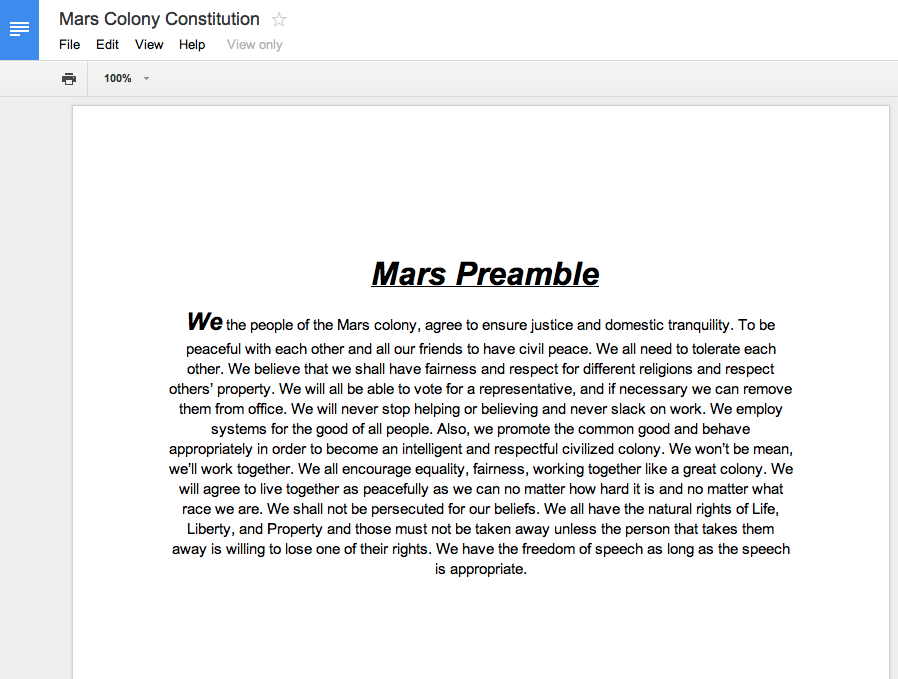
To get my students started, we had a whole-class discussion about what they think we needed to have in our government and what we didn't want to have.  I suggested that they look at the U.S. Constitution's Preamble to see if there was anything in there that we wanted in our own government.  It turns out, we liked a lot of it!

I then handed out several other preambles to other country's constitutions (as well as the United Nations) and asked them to extract phrases out of those that we wanted as well.  They could only use sections that they completely understood and could defend though.
We then created a Google Spreadsheet that I gave everyone access to, and projected it on the board.  After teaching them about the stresses that come with editing the same document as 25 others, I let them add their direct quotes to the spreadsheet.  We now had a long list of phrases that represented beliefs that we had about our government on Mars.
Picture
Click on the image above to view the original document.
Picture
Click on the image above to view the original document.
I had everyone try to eliminate overlapping ideas on the spreadsheet, copy the remaining ideas over to a new shared Google Doc, and revise it so that it looked like a coherent paragraph (and then edit any mistakes).  Believe it or not, our final product was pretty good!
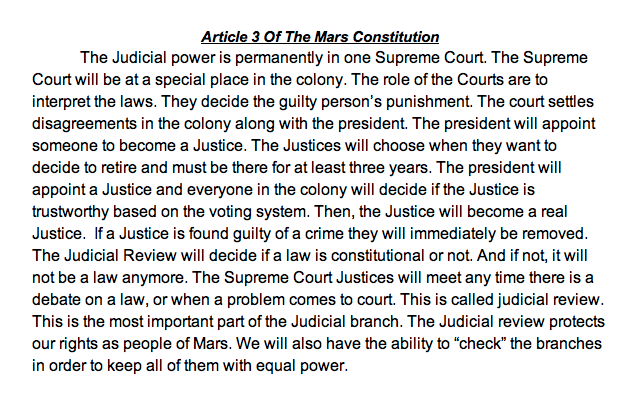
So now that we had our beliefs expressed in our Preamble, it was time to explain how our government would work.  So we decided to write the rest of our constitution!  I pointed out that what we were doing is following a format similar to the U.S. Constitution and my students were pretty amazed!

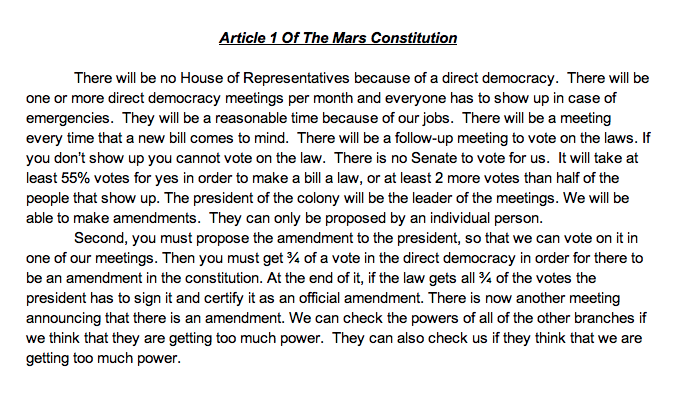
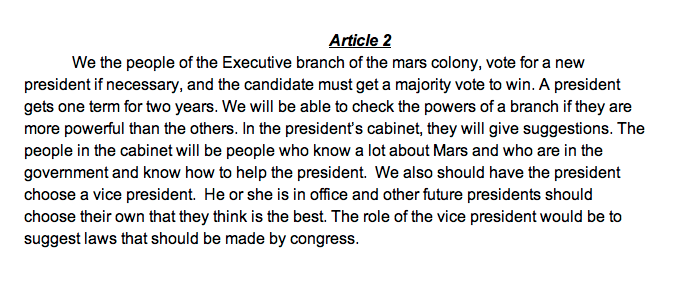
I helped organize the students at first, asking some questions that would get them all on the same page.  Then, based on what they said, I suggested that they divide and conquer to get things accomplished.  Last year, students wanted to base their Mars government on the U.S. Constitution rather than "go rogue!"  I got them to the point where they suggested that they divide up into three groups like the three articles in our Constitution that explains the responsibilities of the Executive, Legislative, and Judicial branches, respectively, and they did!

We used the same Google Doc from our Preamble activity, and each group started on a different page of the GDoc and typed how they thought their branch of the government should operate.  Whenever their branch overlapped with another branch, they sent liaisons to the other group to discuss how they should proceed (some amazing collaboration here!).  Throughout the whole process, I lurked on the GDoc and re-directed them whenever I thought they were getting off-track or going down a dead-end path.  I made suggestions for collaborating with other groups and helped them with their wording when they needed it.
Picture
Click on the image above to view the original document (scroll down).
Picture
Click on the image above to view the original document (scroll down).
Picture
Click on the image above to view the original document (scroll down).
So often in the past, after spending a couple months learning the lessons in the textbook, I would happily move on to the next unit in social studies, but that's not what students need!  They need the opportunity to apply what they've learned to a new situation, and our Mars simulation provides them with that experience.  I encourage everyone to consider taking a content-area unit that they teach every year, and creating a culminating experience where the students can create something using what they've learned from their lessons.  Only then will students hold on to the information that they learned from your instruction!
13 Comments

The Nuts & Bolts of Using Centers in an Intermediate Classroom - What!?

2/1/2014

19 Comments

 
First of all, we call them "Stations" in our classroom. That at least takes some of the "primary" off them!

Stations are an important part of our class for about half the year.  They help me to differentiate instruction for my students, provide enrichment opportunities, allow my students to follow their interests, and most importantly to me: they free up some time to give feedback to my kids on their work!  I often like to schedule as many "pullouts" during this time period as well, since speech, ELL, social work, etc. can all be considered a "station" to a child.  They handle being pulled out so much better when they think of it as a station!

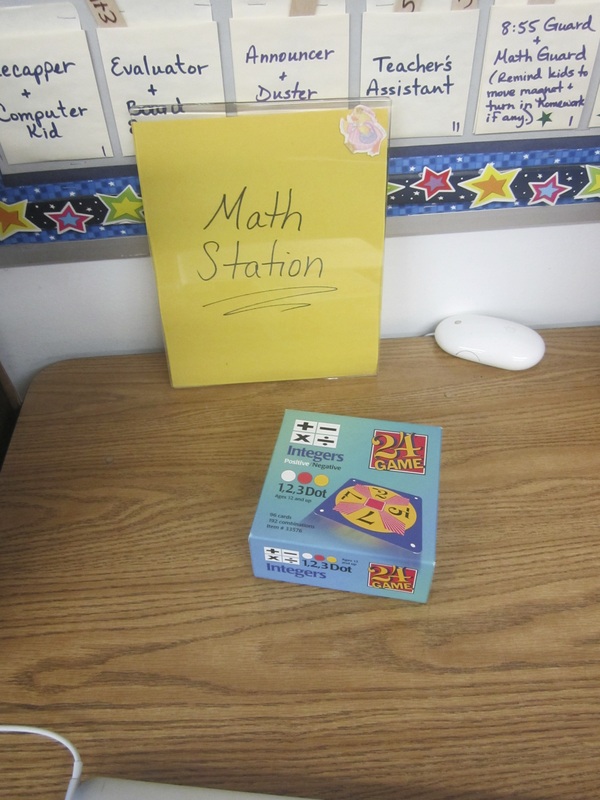
We start "Stations" approximately one third to one half of the way through the school year.  This is when I feel I know my students well enough to create an individualized learning plan for each of my kids without wasting their time.  I have already tried to help them fix certain problems like using periods and capitals, or writing a timed prompt in 15 minutes.  If a student still doesn't show mastery (or close to it) by now, I feel comfortable using some "Stations" time to practice that skill.  It would be silly to do so at the beginning of the year, because so many students improve with just a few reminders or tips.
Picture
Click on any image to enlarge it.


How do I get started with Stations in my Classroom?

Picture
Click on any image to enlarge it.
The rest of this blog post may make more sense after you watch the video at the top of this post.  It shows what the first day of stations looked like in our room.

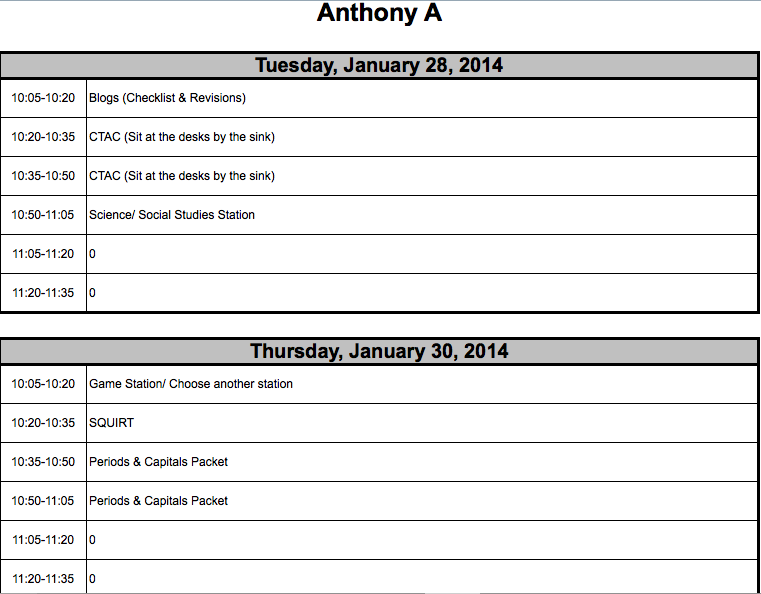
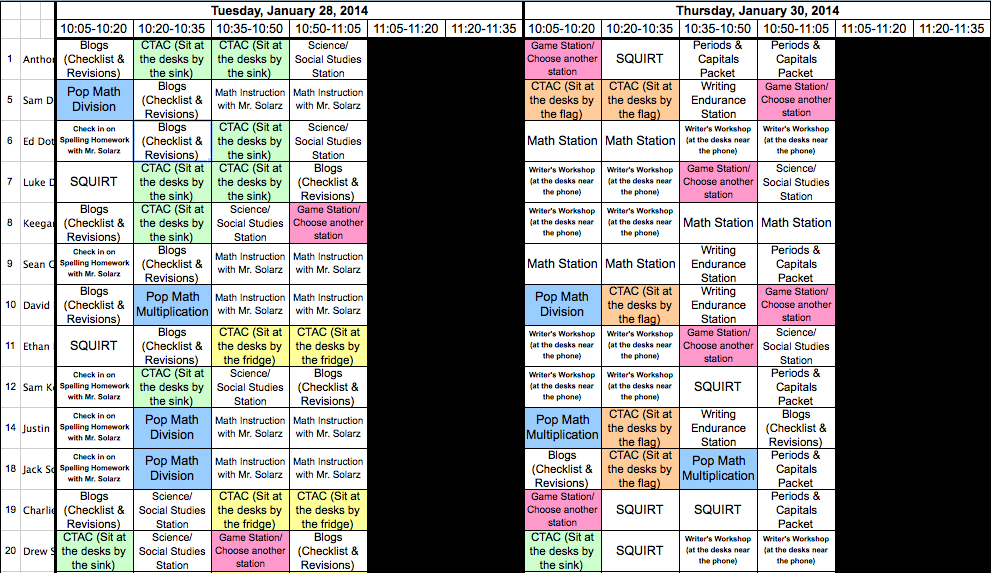
To introduce Stations, I don't spend much time doing so.  I simply tell my students where they can find their schedules for the week (see image at left), show them how to find the directions for each station (seen in the video below), and point to each station in the classroom.  If they need anything from me, it is printed on their schedule to get it from me.  Otherwise, they are not allowed to ask me any questions during a rotation (but they can between rotations).  This is to prevent those constant interruptions while I'm working with a child or a small group.  It also encourages collaboration and problem-solving...


What kinds of stations do I have for my kids? 

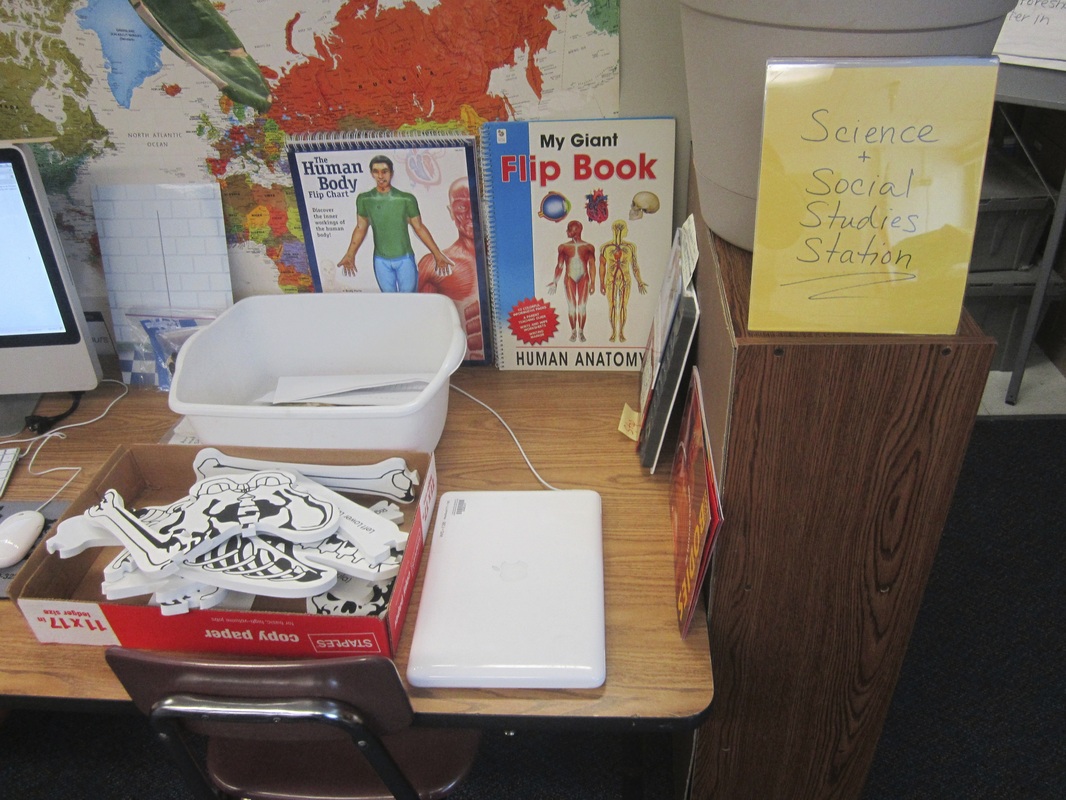
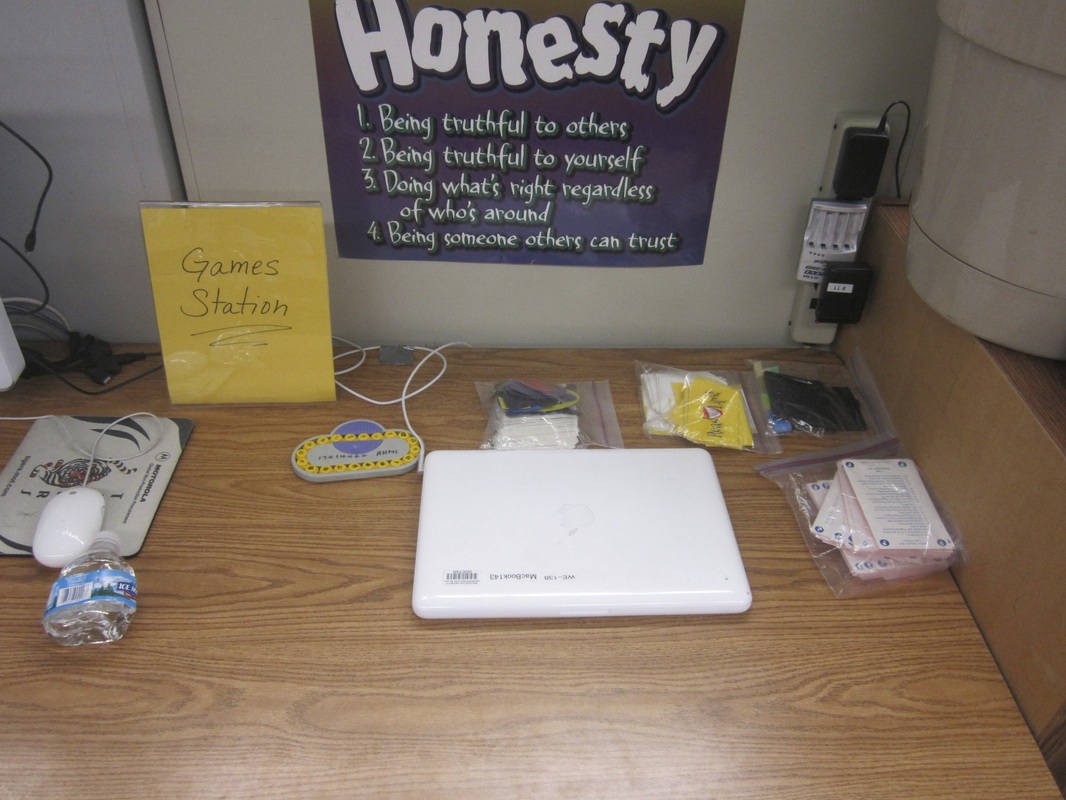
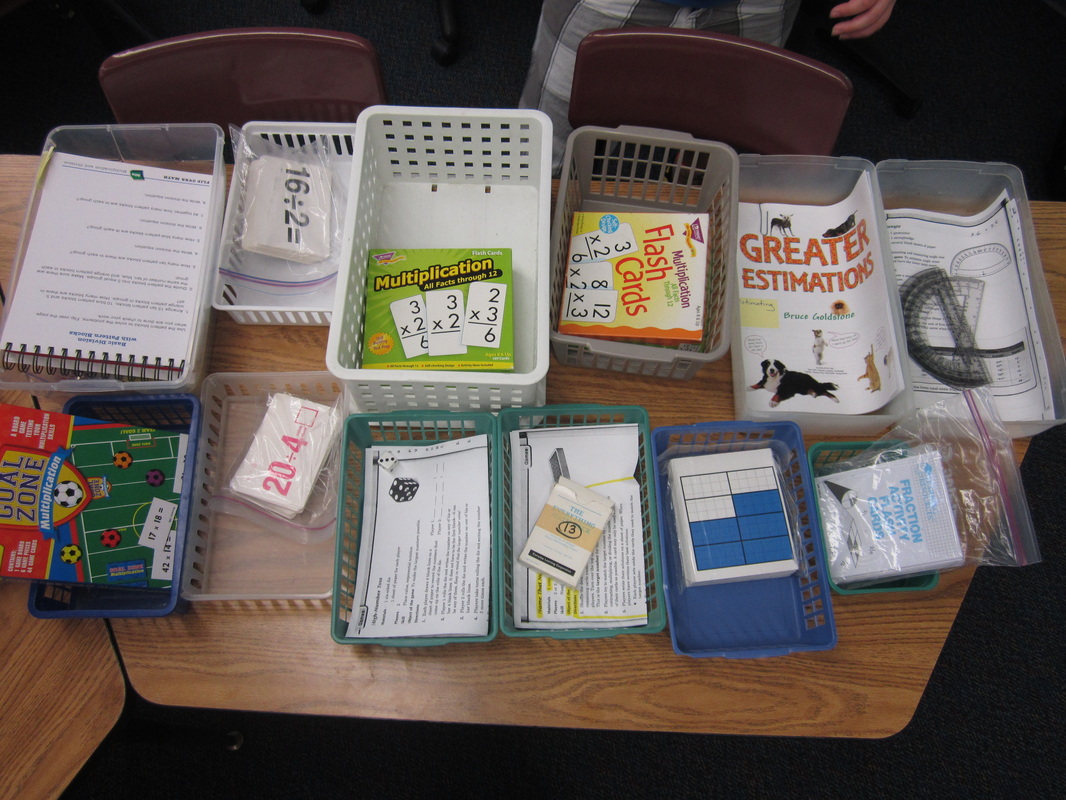
Well, quite a few!  I have the traditional stations based on subjects (e.g. math, science/social studies, writing, etc.), and I have some newer ideas that work best in an intermediate setting.  Those include a Games Station where students have several educational games to choose between.  They have to read the directions themselves (there are always 2-4 students assigned to a station at a time so they can figure it out collaboratively).  You can read about all of my stations in more detail at the end of this post.

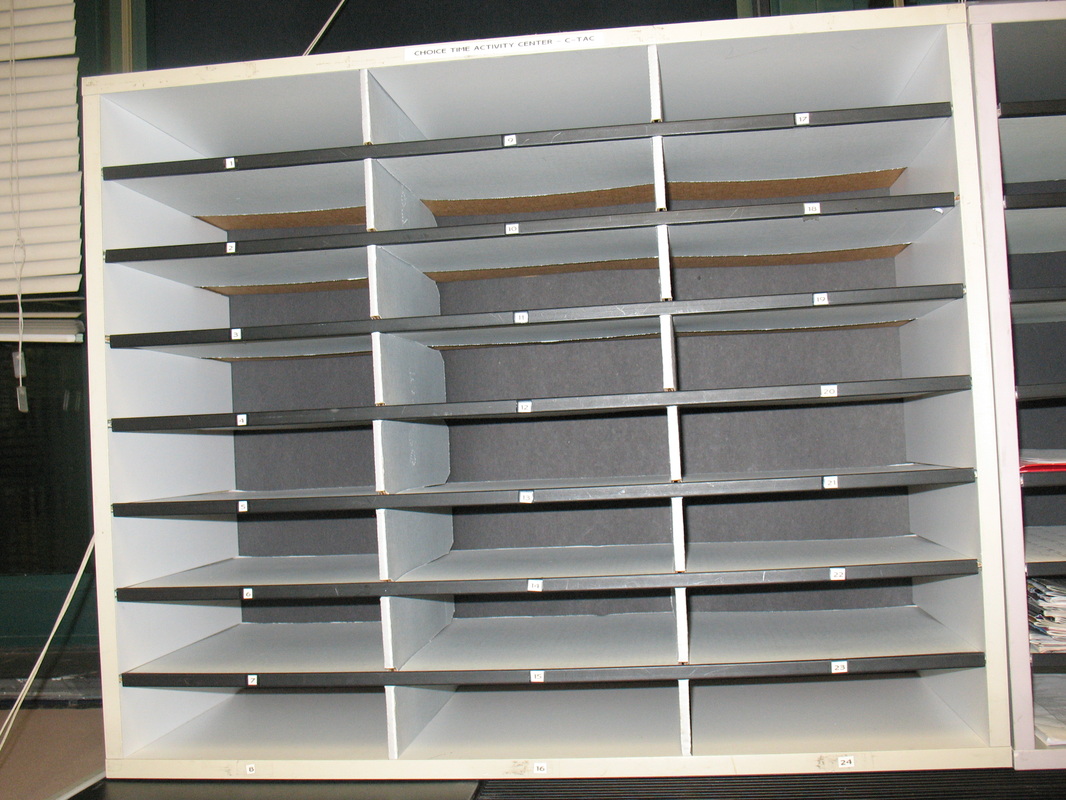
One of my students' favorite stations is actually a packet!  The station is called CTAC, and it stands for Choice Time Activity Center.  This is the name of the place that their CTAC packets are kept.  These packets are often enrichment-based and work directly to increase my students' critical thinking or creative thinking skills.  Some packets are extra practice for skills that a student hasn't mastered yet (they don't really care for those!!!).
Picture
Click on any image to enlarge it.
Picture
Click on any image to enlarge it.
Picture
Our Choice Time Activity Center (CTAC).
Picture
My spreadsheet for keeping track of which CTAC packet each child has been assigned.
Where did I get all of my materials from?

I am a crazy good Garage-Saler!  Every Friday morning throughout the summer, I spend about three hours going to local garage sales and picking up items that would work well in my stations!  I also take things people are throwing away if I think they make a good Station item!  I shop at the Dollar Store and love library sales for craft books or old educational board games!  I've written grants.  I've posted requests on DonorsChoose.org.  There are so many ways to accumulate materials for stations, you just have to keep it on your mind so you don't miss any opportunities for a great deal!  :)

Where do I store all this stuff?

When I moved from my classroom of ten years to a new classroom, I took advantage of the opportunity to re-design my classroom space.  So many people these days are swapping out their desks for tables and getting cool rolley-chairs, but I had a zero dollar budget and a bigger need than comfort.  I had to find a way to store all of my books for my students and all of the materials for my stations!!!

One entire wall of my classroom was a blank slate.  It was actually a foldable wall that originally was opened up, but with my loud voice, no one was ever going to want to open that wall up again with me next door!  So I decided to build a massive shelving system along it.  Here is a detailed explanation with photos of how I built it.  I measured everything out, bought the materials from the local hardware store, and had a finished project for about $600.  It took about two days of labor for two people, and has been a God-send for me!  The slide show below shows where I store most of my station materials.  I also have one cabinet and one additional book shelf by the windows dedicated to station supplies!
How do I schedule students for each station?

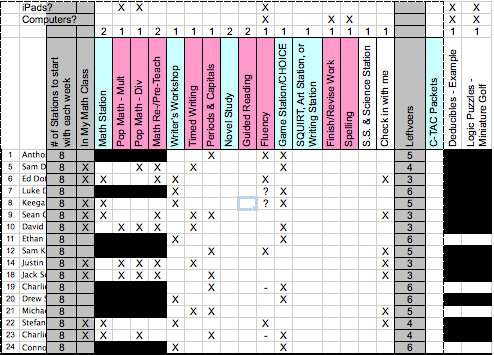
I am a big fan of spreadsheets and have been using Excel since I was a kid!  (I hope I don't lose you as a reader here!)  Although you certainly don't have to take Stations to this level, I love doing so (Sick, huh?)!  Below is a screen shot of my "Planning Worksheet" in my spreadsheet.  It has the students names along the left and the station names at top.  Since many stations are differentiated, I spend time determining which stations each child would benefit from.  Once I have an idea of which stations each child NEEDS, I look at enrichment opportunities and place "X"s in the appropriate cells.
Picture
Click on any image to enlarge it.
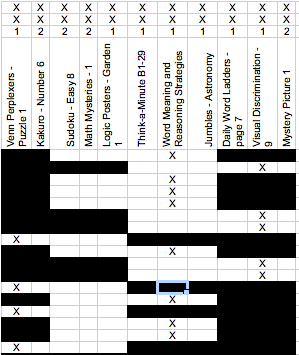
Below is a screen shot of my "Entry Field" worksheet in my spreadsheet.  It has the students names along the left and the times and dates at top.  Black cells indicate that we are not doing Stations at that time (and will produce a "0" on the students' schedule).  The other cells are blank to start.  As I enter the names (and directions) of each station into the cells, the information populates itself on the students' schedules that I will later print out and put in their CTAC bins.  The schedule tells them the date, time, and station for the week.  Excel does this automatically, so I only have to enter the information once onto the "Entry Field" worksheet.  

I use color codes for me, so I can make sure to divide students somewhat evenly when resources are thin, or to ensure that a few people are at a station (and not just one).  I also color code things when trying to make sure I have the right number of kids in my small group when I working with them.  Color codes do not transfer to the students' schedules.
Picture
Click on any image to enlarge it.
Even I get a weekly schedule (and so does my assistant).  That way, we know where we should be at all times.

Stations are an excellent way for me to meet the needs of my students.  It also continues to reinforce the importance of being self-sufficient, problem-solving when stuck, and collaborating with peers rather than relying on teacher direction.  Although my design is quite complex, I encourage you to try Stations with your intermediate students and comment below on your observations!
Picture
Click on any image to enlarge it.
Picture
Click on any image to enlarge it.
More information after the page break below.  Click on "Read More" to read information about each station.

Read More
19 Comments
    Picture
    Picture

    My ePortfolio

    I am Paul Solarz, a 5th grade teacher in Arlington Heights, Illinois who is loving 21st Century Education. Please become part of my PLN on Twitter: @PaulSolarz

    Follow @PaulSolarz
    Tweet

    Archives

    April 2014
    February 2014
    January 2014
    December 2013
    November 2013
    October 2013
    September 2013
    August 2013
    May 2013
    April 2013
    February 2013
    January 2013
    December 2012
    October 2012
    September 2012
    August 2012
    May 2012

    Categories

    All

    RSS Feed

    Tweets by @PaulSolarz
Powered by Create your own unique website with customizable templates.