What's going on in Mr. Solarz' Class?
  • Parent (Current Newsletter)
    • Additional Parent Resources >
      • Homework Guidance for Parents
      • WEX - Writer's Express
      • Our Classroom YouTube Page
      • Should I grade homework?
      • Articles that Explain my Philosophy of Teaching
      • Parents Supporting 21st Century Learning
    • Daily Photo Journal >
      • 2014-2015 DaIly Photo Journal
      • 2013-2014 Daily Photo Journal
      • 2012-2013 Daily Photo Journal
    • Tentative Schedule this Week
    • Parent-Teacher Conference Schedule
    • Monitoring Your Child's Progress in Spelling
    • Calendar
    • Printables
    • 21st Century Skills
    • Westgate Social Work
    • Bessie's Table Soup Kitchen
  • Students
    • Overflow Roll-Out >
      • Contests You Can Enter!
      • Student Quotes
      • Websites to Visit for Homework!
      • REARJMCL
    • Calendar
    • Mini-Lessons
    • I Never Knew That!
    • History Alive! >
      • Sign-In Page
      • Online Tutorial
      • History Alive 10 Quiz
    • Spelling
  • Educators
    • Mr. Solarz' ePortfolio >
      • Teacher Evaluation
      • Domain3
      • Domain4
      • My Digital Scrapbook
      • Finland
    • Workshops I've Led >
      • How to Set Up and Run a Mystery Skype Session
      • Creating Your 21st Century Classroom
      • Twitter for Educators
      • Leading Children to Pursue their Passions
      • Becoming a Global Classroom Through Mystery Skypes
      • Enriched Learning Projects
      • Developing Units with 21st Century Skills in Mind
      • Who Owns the Learning? Examples of 5th Graders Running the Show
      • A Brief Introduction to China (for 2nd Graders)
    • 21st Century Learning >
      • Resources for Teachers >
        • 21st Century Skills
        • The 21st Century Skill Series of Videos
      • Examples of 21st Century Education in Action >
        • Self-Directed Students
      • 21st Century Assessment
      • Web 2.0 Tools Used in Our Classroom
      • Articles for 21st Century Teaching (Updated Daily)
      • Motivational Speakers
    • Curricular Units >
      • Social Studies Units >
        • The 2012 Presidential Election
        • The Revolutionary War
        • U.S. Constitution and Government
        • Westward Movement
      • Science Units >
        • Energy
        • Science Fair
        • Human Body Systems in Motion
        • Human Body Systems in Motion
        • Watery Earth
    • EdChat Archives >
      • #TLAP
      • #5thchat
      • #21stedchat
    • My Philosophy of Education
    • Tips and Tricks for the Elementary Classroom
    • China (Photos)
  • Past
    • 2013-2014 >
      • Year-Long Activities >
        • Passion Time >
          • Passion Projects >
            • 2013-2014 Passion Projects >
              • Passion Projects 10/11/13
              • Passion Projects 11/22/13
              • Passion Projects 12/20/13
              • Passion Projects 2/12/14
              • Passion Projects 3/21/14
              • Passion Projects 5/2/14
              • Passion Projects 6/2/14
            • 2012-2013 Passion Projects >
              • Passion Projects 1
              • Passion Projects 2
          • Guidelines for Creating Your Final Product
        • New Assignments
        • Mystery Skype
        • Literature Circles >
          • Discussions & Signposts
          • Book Talks >
            • Submit Your YouTube URL Here
      • Spring Trimester >
        • Our Learning Experiences
        • Westward Expansion >
          • Oregon Trail Pastimes
          • VoiceThread Blog
          • Pinterest
          • VoiceThread
          • Timeline
          • Diigo
          • Google Presentation
          • Photo Stories
          • Tableaux Vivants
          • Daily Travel Log
          • Fictional Travel Log
          • Video Journal
        • WEX - Fictional Narratives
        • 21st Century Skills
        • Motivational Posters
        • Watery Earth >
          • Bodies of Water
        • Colonize Mars! >
          • Claiming Mars For Ourselves
      • Winter Trimester >
        • 100 Word Challenge
        • Stations
        • Human Body Unit
        • Out Of My Mind
      • Fall Trimester >
        • Historical Reenactment
        • Tessellations
    • 2012-2013 >
      • April/May/June >
        • Mystery Skype
        • Colonize Mars!
        • Science Fair 2013
      • February/March >
        • ThingLink
        • Human Body
        • Revolutionary War Simulation
        • Global Literature Circles
        • ISAT Test Prep
      • January >
        • Field Museum
        • Wonder >
          • Character Analyses
          • Teacher Notes for Wonder - R.J. Palacio
        • Google Groups
      • November/December >
        • 12/12/12
        • Energy Debates >
          • Energy Debates Videos!
          • Energy Debate Blog Template
        • Presidential Elections >
          • The 2012 Presidential Election
          • Presidential Election Glogs
          • Presidential Character Traits
          • Political Parties >
            • Democratic Party
            • Republican Party
            • Green Party
            • Constitution Party
            • Libertarian Party
          • Virtual Debate >
            • Education
            • Health Care
            • Social Security
            • Immigration
          • Infographic Lessons on Prezi
          • Political Polls
          • ELECTION TIME!!!
      • October >
        • Creating Your Class Badges Account
        • Properties of Quadrilaterals
        • WEX Lesson 33 - Human Sculptures
        • Energy
        • 10-11-12 What's Special About It?
        • Mr. Badynee's 50th Birthday!
      • September >
        • Constitution Day - September 17, 2012
        • Character Traits Thesaurus
        • Mad Libs!!!
        • Grammar
    • 2011-2012 >
      • May/June >
        • Science Experiments >
          • Marble Coasters
          • Bubble Busters
          • Geodes
          • Naked Egg Drop
        • Oregon Trail >
          • Reflection Activities >
            • Pinterest
            • Voice Thread/Garage Band
            • Timeline of Events
            • Diigo
            • Google Presentation
            • Photo Album
            • Tableaux Vivants
            • Video Updates
            • Daily Travel Log
            • The "Very Unrealistic Accounts" of our trip west
          • Miscellaneous >
            • Audio ThingLink Map
            • Passtimes/Games/Songs
        • Niche Theory
        • The 5 Love Languages
        • Pool Party
        • History Alive 17
        • Field Day
      • March/April >
        • Phantom Tollbooth >
          • Homework >
            • HW Due 5/3/12 by 4:00 p.m.
            • HW Due 5/14/12 by 4:00 p.m.
            • Character Forum
            • New Characters
            • New Settings
          • Roles >
            • 1 - Detail Tracker
            • 2 - Psychologist
            • 3 - Professor
            • 4 - Philosopher
            • 5 - Cartographer
        • Human Body >
          • Human Body Posters (Pre-Assessment)
          • Human Body Lessons >
            • Heart Rate Graphs
            • Exercise Graph
            • Clothespin Lesson
            • Creating Aliens
            • Hinge Joint Videos
          • How to Write a Reflection
          • Final Assessment & Reflection
        • WEX Fictional Narratives >
          • Sticky Podcasting
          • Podcasts
          • Writing Picture Books
        • Project Citizen: Westgate Database
        • Arbor Day
        • Zero Degree Party!
        • Judge Tristano Visit
      • January/February >
        • Kate Klise Assembly
        • Lara in "Annie"
        • Glogster Project
        • Science Fair
        • Valentine's Day Party
        • Teacher Appreciation Week
      • November/December >
        • Chinese Calligraphy
        • Energy
        • Energy Debates
      • September/October >
        • Rev. War Hero Projects
        • Stations
        • Halloween Party
        • Fall Links
      • Videos
  • Present
    • Passion Time >
      • Passion Time Steps
      • Submit Your Essential Question
      • Essential Questions
      • How to Post Your Passion Project Online
    • 2014-2015 Miscellaneous
    • Energy
    • Wonder
    • Grammar
  • Future
    • Learning About 21st Century Skills
    • Creating Infographics
    • Utilizing the Left and Right Sides of Your Brain
    • Comments 4 Kids
    • Innovation in the Classroom
    • Online Quizzes and Polls
    • Solar Maximum
    • Vocabulary/Parts of Speech
    • The Five Things I've Learned
    • Vialogues (Video Discussions)
    • Creating Online Videos
    • Advanced Storytelling
    • Test Anxiety
    • Responding to Blog Entries
    • Writer's Workshop Blog
    • Recipe Project (Blog)
  • e-Portfolios
    • 2014-2015 Students >
      • Student ePortfolios 0-7 >
        • 1 - Michael
        • 2 - Charlie
        • 3 - Nicole
        • 4 - Stacy
        • 5 - Bela
        • 6 - Kendall
        • 7 - Demetri
      • Student ePortfolios 8-14 >
        • 8 - Emily
        • 9 - Nicky
        • 10 - Hanna
        • 11 - Payton
        • 12 - Hasanain
        • 13 - Tucker
        • 14 - Chris
      • Student ePortfolios 15-21 >
        • 15 - Madi
        • 16 - Aidan
        • 17 - Luke
        • 18 - Kaela
        • 19 - Ryan
        • 20 - Alison
        • 21 - Lucas
    • 2013-2014 Students >
      • Student ePortfolios 0-9 >
        • 0 - Mr. Solarz' Sample Portfolio
        • 1 - Anthony A.
        • 2 - Annie B.
        • 3 - Sadie D.
        • 4 - Ellie D.
        • 5 - Sam D.
        • 6 - Ed D.
        • 7 - Luke D.
        • 8 - Keegan D.
        • 9 - Sean G.
      • Student ePortfolios 10-18 >
        • 10 - David K.
        • 11 - Ethan K.
        • 12 - Sam K.
        • 13 - Abby K.
        • 14 - Justin L.
        • 15 - Jill L.
        • 16 - Giana M.
        • 17 - Charlotte O.
        • 18 - Jack S.
      • Student ePortfolios 19-27 >
        • 19 - Charlie S.
        • 20 - Drew S.
        • 21 - Michael S.
        • 22 - Stefan S.
        • 23 - Charlie S.
        • 24 - Connor W.
        • 25 - Emily W.
        • 26 - Emma W.
        • 27 - Julia Z.
    • 2012-2013 Students >
      • Student Blogs 1-9 >
        • Blog 1
        • Blog 2
        • Blog 3
        • Blog 4
        • Blog 5
        • Blog 6
        • Blog 7
        • Blog 8
        • Blog 9
      • Student Blogs 10-17 >
        • Blog 10
        • Blog 11
        • Blog 12
        • Blog 13
        • Blog 14
        • Blog 15
        • Blog 16
        • Blog 17
      • Student Blogs 18-25 >
        • Blog 18
        • Blog 19
        • Blog 20
        • Blog 21
        • Blog 22
        • Blog 23
        • Blog 24
        • Blog 25
        • Blog 0
    • 2011-2012 Students >
      • Girls from 2011-2012 >
        • Gwendolyn Bennet >
          • Mars Travel Log
        • Dong Ling >
          • Mars Travel Log
        • Sophia Castro >
          • Mars Travel Log
        • Tristan Ely >
          • Mars Travel Log
        • Christine DuPont >
          • Mars Travel Log
        • Ira Matheus >
          • Mars Travel Log
        • Nicoletta Innazzo >
          • Mars Travel Log
        • Kade Bahari >
          • Mars Travel Log
        • Hava Raya >
          • Mars Travel Log
        • Kim Soo >
          • Mars Travel Log
        • Nabili Ngoumba >
          • Mars Travel Log
        • Britta Larson >
          • Mars Travel Log
        • Kristin Gola >
          • Mars Travel Log
      • Boys from 2011-2012 >
        • Dutch Vermont >
          • Mars Travel Log
        • Jose Leonardo >
          • Mars Travel Log
        • Otis Marley >
          • Mars Travel Log
        • Jose Rodriguez >
          • Mars Travel Log
        • Peter Anderson >
          • Mars Travel Log
        • Samir Bakri >
          • Mars Travel Log
        • Sefu Wellingtin >
          • Mars Travel Log
        • Raja Bello >
          • Mars Travel Log
        • Robert Gagne >
          • Mars Travel Log

Introducing Blended Learning to 5th Graders in a Traditional Classroom

1/27/2014

5 Comments

 
"Blended learning is a formal education program in which a student learns at least in part through online delivery of content and instruction with some element of student control over time, place, path or pace.[1] While still attending a “brick-and-mortar” school structure, face-to-face classroom methods are combined with computer-mediated activities.[2] Proponents of blending learning cite the opportunity for data collection and customization of instruction and assessment as two major benefits of this approach.[3] Schools with blended learning models may also choose to reallocate resources to boost student achievement outcomes.[4]"

-Wikipedia
Since Blended Learning requires a mixture of online instructional delivery and face-to-face instruction, it only seems natural that students growing up in a traditional classroom may find that model a bit difficult to adjust to.  After all, they've been used to a constant teacher presence with peers nearby!  Therefore, I have been slowly introducing my students to a Quasi-Blended Learning Environment over the course of the school year where some directions are posted online and some of their work needs to be done online!
Picture
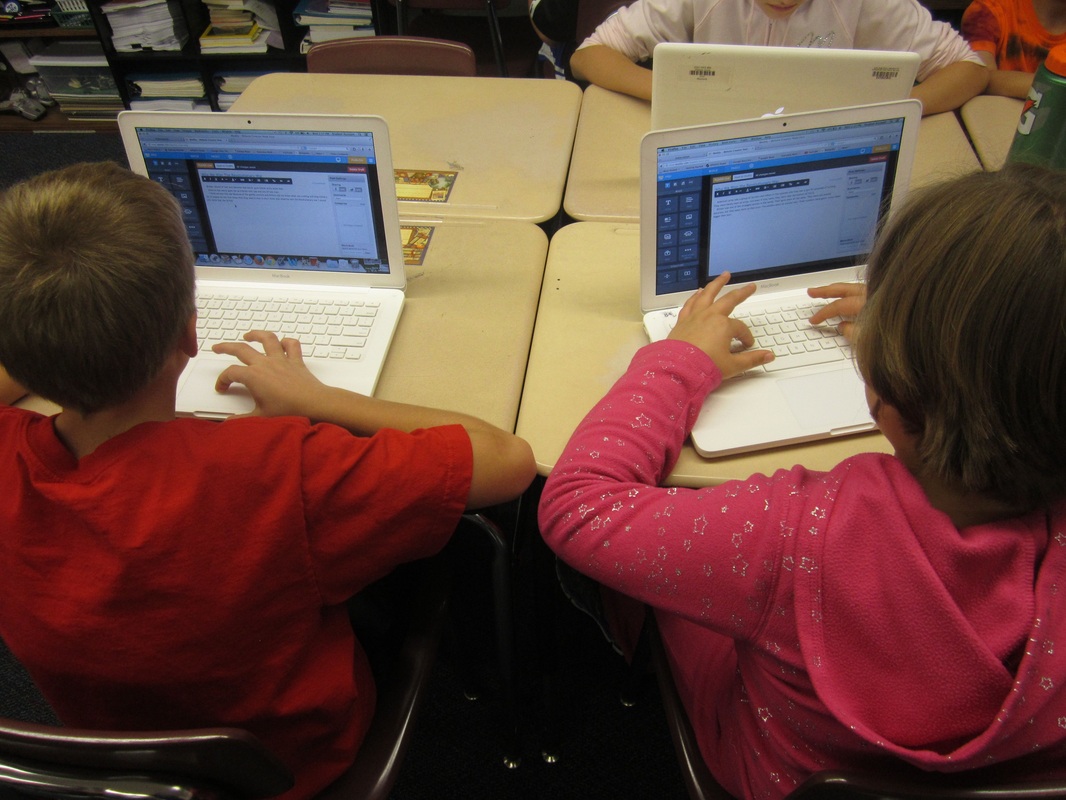
Students independently posting work onto their ePortfolios.
Picture
Picture
Picture
Picture
Picture
I've used a gradual release of responsibility model with my students to get started in Blended Learning:
  • I work, you watch.
  • I work, you help me.
  • You work, I help you.
  • You work, I watch.

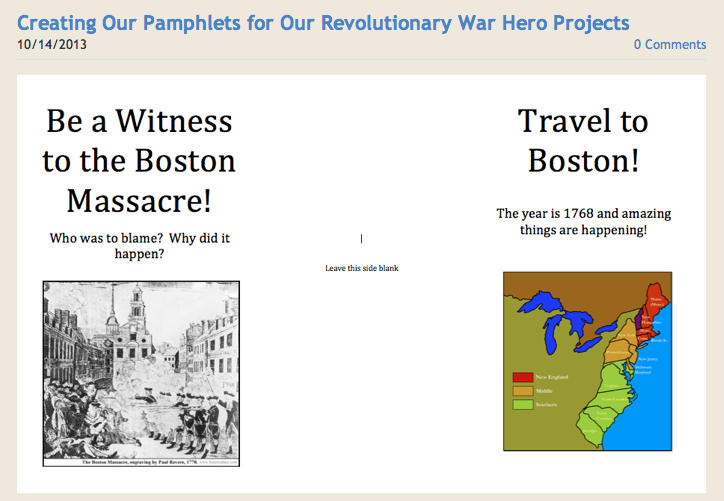
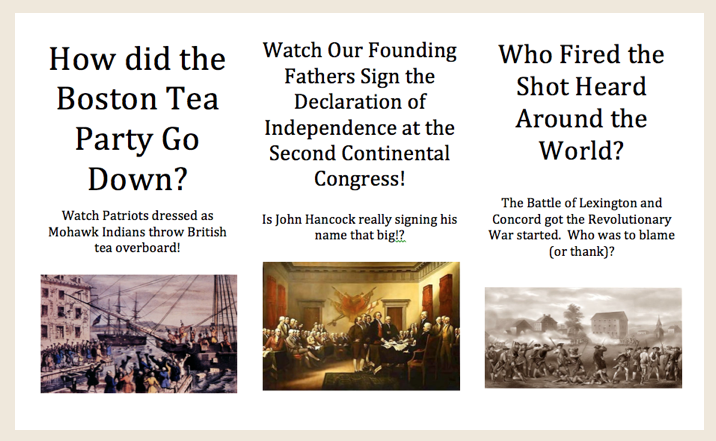
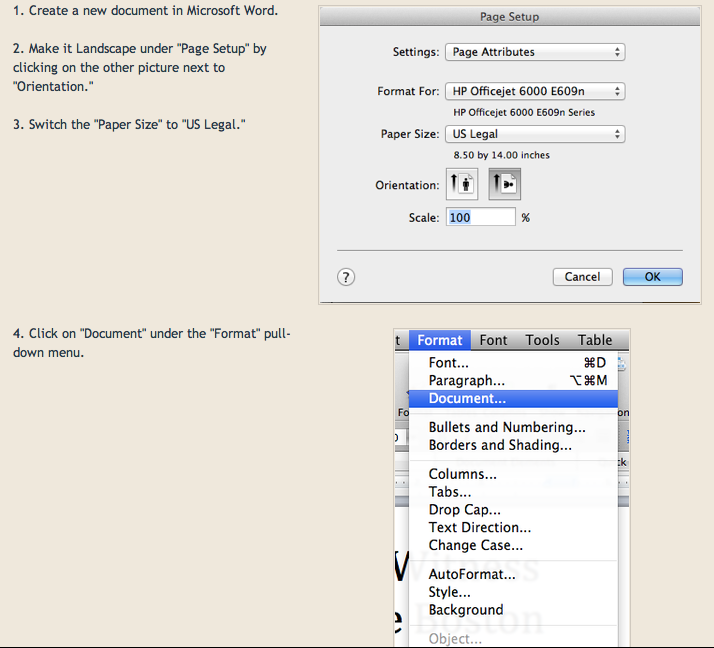
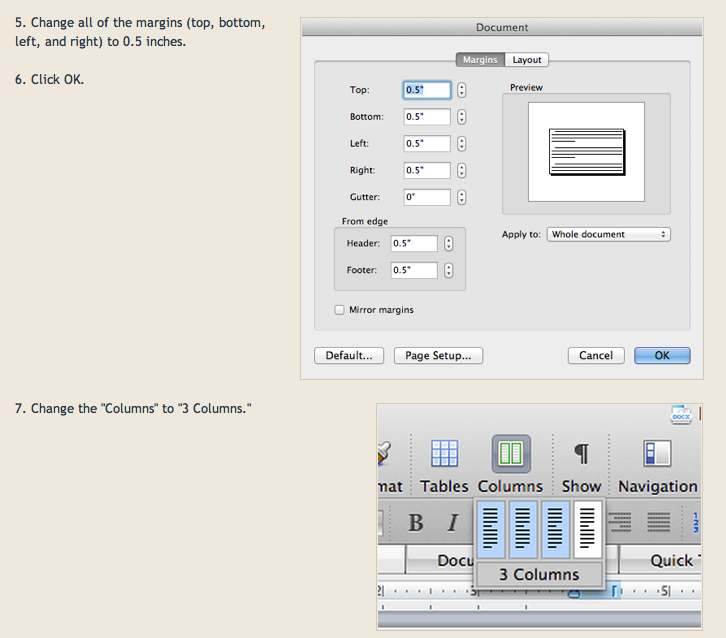
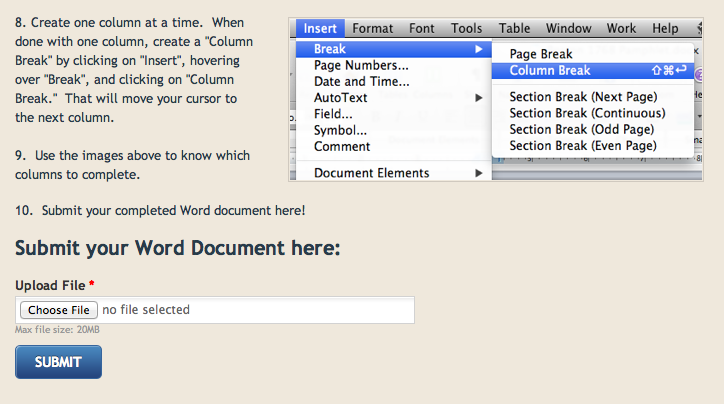
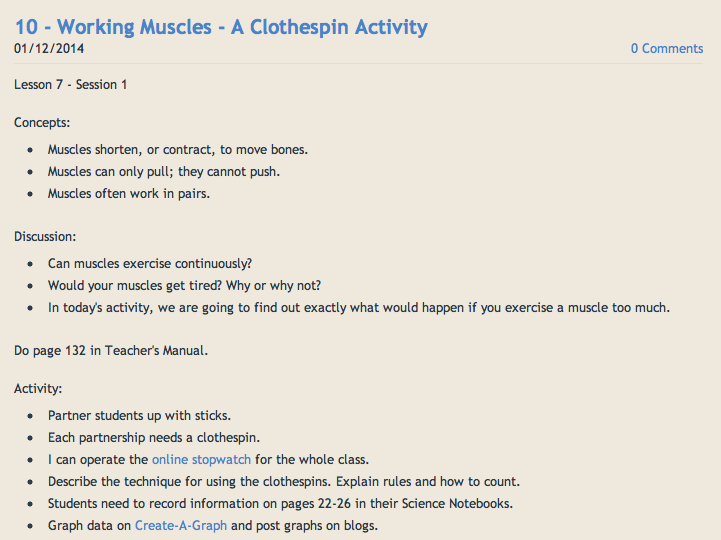
At the left is a sample lesson I did towards the beginning of the year to help my students become more comfortable with blended learning. In this lesson, my students are given some directions that are posted online (All images on the left will enlarge if clicked on). (Here is the link to the original post, as well.) I go over the directions with them so they understand everything before starting. I do a few tasks for them, they help me do a couple more, and then they do some tasks while I give feedback.  The rest of the steps are done on their own or with peer support.

Based on the successes and challenges of this lesson, I adjust the next quasi-blended learning lesson accordingly.

By the end of the year, students should be able to read the directions online, and follow all the steps successfully without adult support.  This is preparing them for a more literal interpretation of Blended Learning!

Notice that in the example to the left, I use a combination of screen shots, step-by-step instructions, and forms for my students.  Just like a checklist, students can successfully complete an assignment by following the directions closely and mentally checking off tasks as they are completed.  

Some students struggle with this at first and need teacher guidance to be successful in this style of instruction.  By doing these in class before they are expected to be able to do this from home (or in class independently), you are building their schema to be successful.

Some would look at this sample lesson as a lesson on technology, but I look at it as so much more.  Students are synthesizing their knowledge of their Revolutionary War Hero after spending weeks researching and creating small pieces of evidence to show knowledge and understanding.

Since students have to follow written directions somewhat independently and manage their time, they are also working on their executive functioning skills.

By the end of an assignment like this, I have a better understanding of what support each of my students needs going forward.  If we did this assignment step-by-step together as a whole class, I would not know which students were able to do this independently and which students needed support.
Quasi-Blended Learning supports differentiated instruction, in that students can work at their own pace, choose the complexity in which they complete the assignment, and are able to add creative touches (or not) based on ability and interest.

Since I do not spend a ton of time presenting content to my students (I prefer they experience content through simulations or PBL), I do not have my students watch videos of me or others teaching.  When I choose to lecture, I prefer that my students are with me so it can be a whole-class discussion rather than a "sit and git" session.  One exception is math, where I always have about a 15-30 minute lesson, but again, having my students be a part of the lesson "live" is still important to me so I can immediately check for understanding, ask questions before moving on, have them do sample problems with their peers, etc.

OK, so some of our directions are posted online.  What about student work?  Well, I have my students post their work online as well.  Each student maintains their own personal ePortfolio of their work.  Once they are finished creating something from their directions, they post it online, possibly answer some pre-assigned questions about it, and write a reflection statement.  Ideally, the teacher would give 1-on-1 feedback in the next couple of days to further assess the student's understanding of the content or skill, as well as to extract more information than the child's summary contains.  (I crave the opportunity to do this, but haven't figured out a way to create the time just yet.)

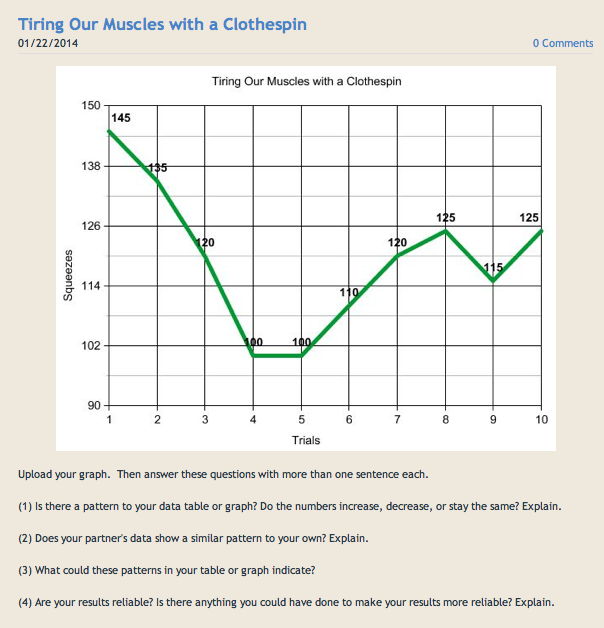
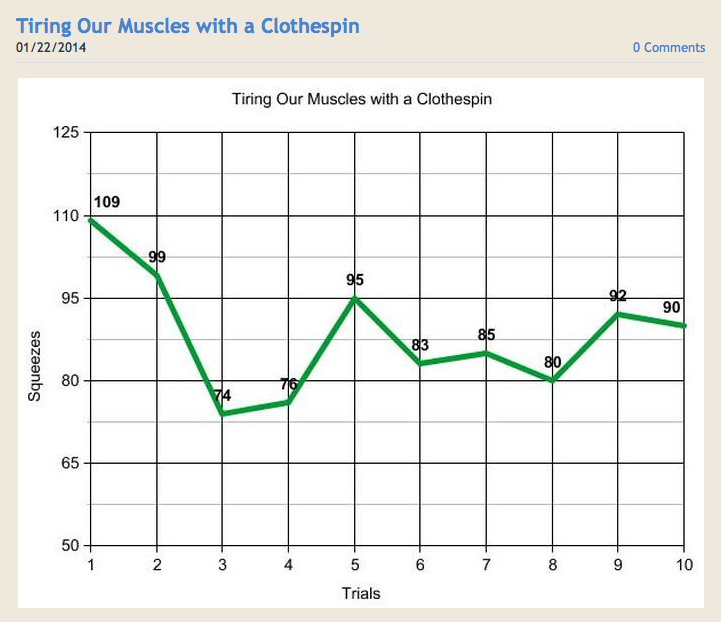
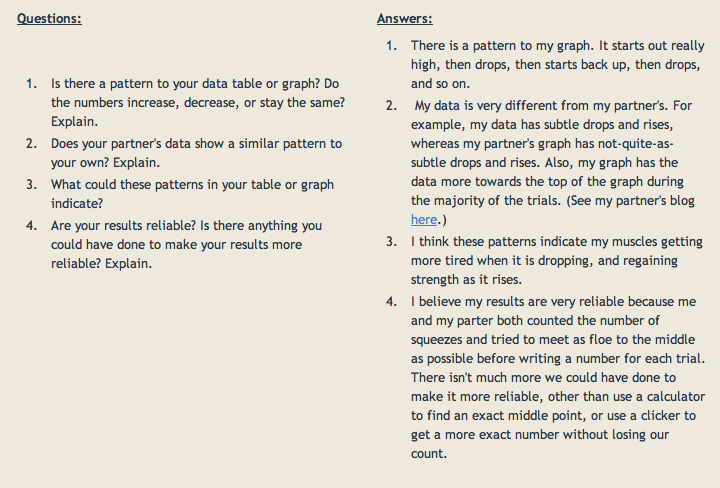
Below is a sample activity that shows where we are at today (mid-year) in the process of getting my students ready for a blended learning environment.  We are learning about the human body in science - I have a blog dedicated to those lessons that my students have 24/7 access to.  I show them a sample blog entry for them to model their own.   When the lesson is complete, students will have a blog entry associated with each lesson (click each image to enlarge them):

Directions:
Picture
Click to enlarge.
  • Click here to go to the original entry.
  • Click here to go to the Human Body Activities blog.

Sample Blog Entry:

Picture
Click to enlarge.
  • Click here to go to this sample blog entry.
  • Click here to go to my sample ePortfolio.

Student Blog Entry:

Picture
Click to enlarge.
Picture
Click to enlarge.
  • Click here to go this example blog entry.
  • Click here to go to Julia's ePortfolio.
5 Comments
reflective essay help link
4/8/2016 05:35:48 am

Your ideas about study very helped-full thanks for share it .

Reply
Rick Pagels link
3/2/2017 01:29:24 am

Good Day, Mr. Solarz! My name is Rick Pagels, and I'm the Educational Technologist at Sembach Middle School. I noticed you did something with a 5th grade, using Trello. As I was reading, I saw something that referenced "The Trello computer". I too am trying to use Trello, and am struggling with whether students should have their own Trello accounts, or if I should do it another way, and so I wonder if you can give me any pointers or suggestions? I teach Teachers, and help them teach grades 4 through 8th. Thanks if you can reply! :-)
- Rick

Reply
Paul Solarz
3/5/2017 10:12:59 pm

Hi Rick - Although there are many ways to use Trello nowadays (their Terms of Service now allow students to have their own account), I continue to have my students use my account and post everything on one board. I post my username and password for my students to use. I have one desktop computer in my classroom, and during Passion Time, we deem it the "Trello Computer." Kids take turns using it to create and update their Trello cards. Once their cards are made, technically students can use their own computers, but there have been glitches when many people are simultaneously signed into my account & creating cards where information gets switched between cards. Therefore, we try to restrict Trello use to one computer. At this point, it's possible that students could misuse this and I would not know until someone told me (because I rarely look through our board since students take screen shots of their cards & post them on their blogs). Hopefully, I've taught them not to do that, but I have no safeguards in place to prevent it! Hope that helps!

Reply
Life coach training link
6/7/2020 07:39:29 am

Wow! It is an amazing blog and infact I too am in a favor of blended learning. Education system has evolved these days and online coaching has a great potential these days especially in COVID crisis. Online training is the future of education.

Reply
Michelle Lopez
7/27/2026 10:19:32 pm

I would strongly love to recommend the services of the best team of dark web hackers. They are professional and very discreet in carrying out their jobs, they have the best customer service agents and satisfaction at heart. If you have any services you wish to contact them for, go on REALCYBERHACKERS @ GMAIL . COM/ Whatsapp +14106350697 They help track and monitor your cheating partner's phone without his idea, clear or erase criminal records as well as repair a bad credit score, all social media hacks,funds recovery and many others.

Reply


Leave a Reply.

    Picture
    Picture

    My ePortfolio

    I am Paul Solarz, a 5th grade teacher in Arlington Heights, Illinois who is loving 21st Century Education. Please become part of my PLN on Twitter: @PaulSolarz

    Follow @PaulSolarz
    Tweet

    Archives

    April 2014
    February 2014
    January 2014
    December 2013
    November 2013
    October 2013
    September 2013
    August 2013
    May 2013
    April 2013
    February 2013
    January 2013
    December 2012
    October 2012
    September 2012
    August 2012
    May 2012

    Categories

    All

    RSS Feed

    Tweets by @PaulSolarz
Powered by Create your own unique website with customizable templates.